


XML / HQL Dynamic SQL Preview
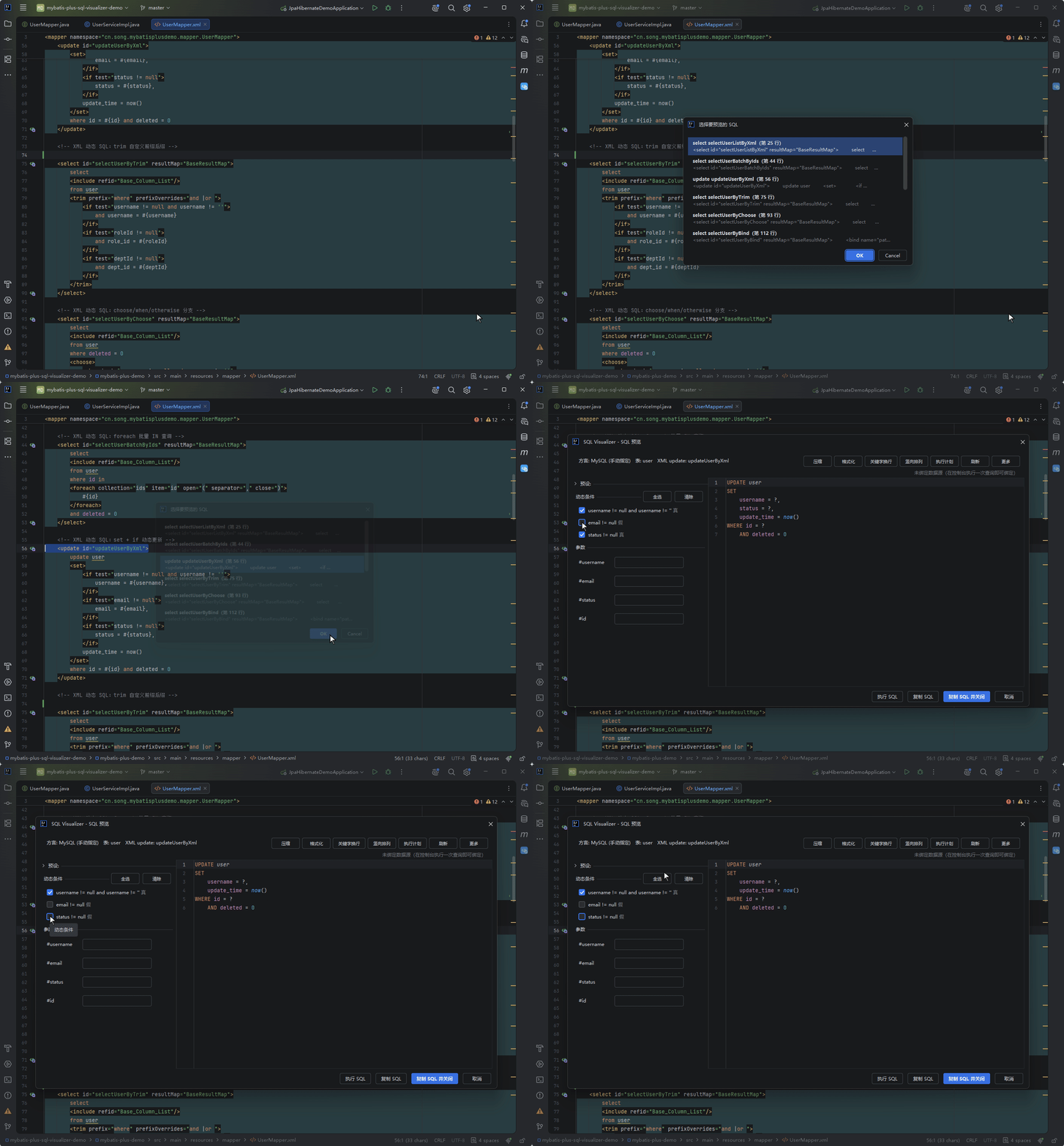
Complete preview of dynamic SQL in mapper XML — rendered per MyBatis semantics with OGNL expression toggles. Hibernate HQL and JPA JPQL previews are supported as well (see below).
Trigger Method
Gutter icon at <select> / <update> / <delete> / <insert> lines in mapper XML. Click to preview.
Mapper XMLs from in-house frameworks (root element name not fixed, SQL written inside custom tags as CDATA or text — RFListPage and the like) preview as well: once the first text segment of a leaf tag starts with SELECT / INSERT / UPDATE / DELETE / WITH / REPLACE, the gutter icon appears, with no reliance on tag or root element names.
Settings → "Interface & actions" has a master switch, "Detect SQL embedded in generic XML (leaf tag text/CDATA)", on by default.
HQL carriers in generic XML (When to read: your custom tags contain HQL)
When the carrier tag itself or an ancestor carries type="hql" / "jpql", the HQL conversion pipeline handles it (alias-scoped property-to-column mapping applies as usual); if the entity can't be resolved or conversion fails it falls back to showing the original text. The right-click and Alt+Shift+Q entries plus the multi-statement picker behave the same as for mapper XML.
Mapper Two-Way Navigation
Mapper XML select / insert / update / delete tag lines and Mapper interface method lines each get a navigation gutter icon, clicking either jumps to its counterpart: from the XML statement line to the interface method, and from the interface method to the XML statement.
Targets are resolved by namespace + tag id; when resolution fails no icon is shown — the plugin never guesses a same-named method as a fallback. The icons obey the gutter master switch and the "mapper XML statements" group switch in settings.
Coexisting with peer navigation plugins (When to read: you have MyBatisCodeHelperPro or similar installed)
When a peer MyBatis navigation plugin (currently: MyBatisCodeHelperPro) is enabled, it draws its own jump arrow on the same line — two icons stacked on one line help nobody, so this plugin yields its two navigation icons by default. The behavior is controlled by the setting "Yield Mapper navigation icons when a peer MyBatis navigation plugin is present" (on by default, in the same block as the gutter group switches): turn it off to keep this plugin's icons even when the peer is present. Other gutters (SQL preview, annotation SQL, JPA / HQL, JDBC, Wrapper chains, etc.) are unaffected by the yielding.
Supported Dynamic Tags
| Tag | Description |
|---|---|
<if> | Conditional rendering, test expressions toggleable in panel |
<choose> / <when> / <otherwise> | Branch selection |
<where> | Smart WHERE concatenation (strips AND/OR) |
<set> | Smart SET concatenation (strips commas) |
<foreach> | Collection iteration, values editable in panel |
<bind> | Variable binding |
<sql> + <include> | SQL fragment reuse, fully-qualified cross-namespace refid supported |
<trim> | Custom trimming |
Cross-Namespace Includes
Fully-qualified refid="other.namespace.fragmentId" includes expand across files — the preview finds the mapper file whose namespace matches, takes the <sql id> fragment content out and merges it in at the reference site.
Dynamic tags inside the fragment (<if> / <foreach> etc.) render as usual, ${} dynamic refids are supported, and property substitution plus cycle detection apply the same.
When the target can't be resolved the preview continues, with the warning naming the concrete reason: no mapper file for the namespace / no such fragment under that namespace / the same fragment id declared in multiple files (ambiguous — the difference is reported as-is). Bare ids still resolve within the current file only, matching MyBatis runtime behavior.
Mapper XML Editing Support
Beyond previewing, the plugin injects a set of capabilities into the mapper XML editor itself:
- Syntax coloring: statement text is colored per SQL syntax — keywords / table names / columns / operators in distinct colors,
#{}and${}placeholders colored differently with a background tint, fine-grained OGNL coloring inside${}and attribute values, and coloring fortest/valueattribute expressions; colors are customizable in the plugin's color settings page - Typing and completion: typing
#/$auto-closes{};#{}placeholders complete structural attributes (jdbcType/javaType/typeHandleretc.), tag attribute values (id/refid/resultMap/resultType/parameterTypeetc.) complete across the board, resultMapcolumnattributes complete with column names, andmybatis-config.xmlconfiguration options complete as well - Reference navigation:
<include refid>, resultMap references and the like can jump between definition and usages - Dynamic tag folding:
<if>/<where>and other dynamic tags fold along the statement structure
Coexisting with other SQL plugins (When to read: another SQL coloring plugin is installed and mapper XML coloring looks off)
Coloring yields per injection region — only the regions the other plugin actually colors are given up, everything else keeps this plugin's coloring. No more "detected a peer, give up the whole file" behavior.
OGNL Expression Panel
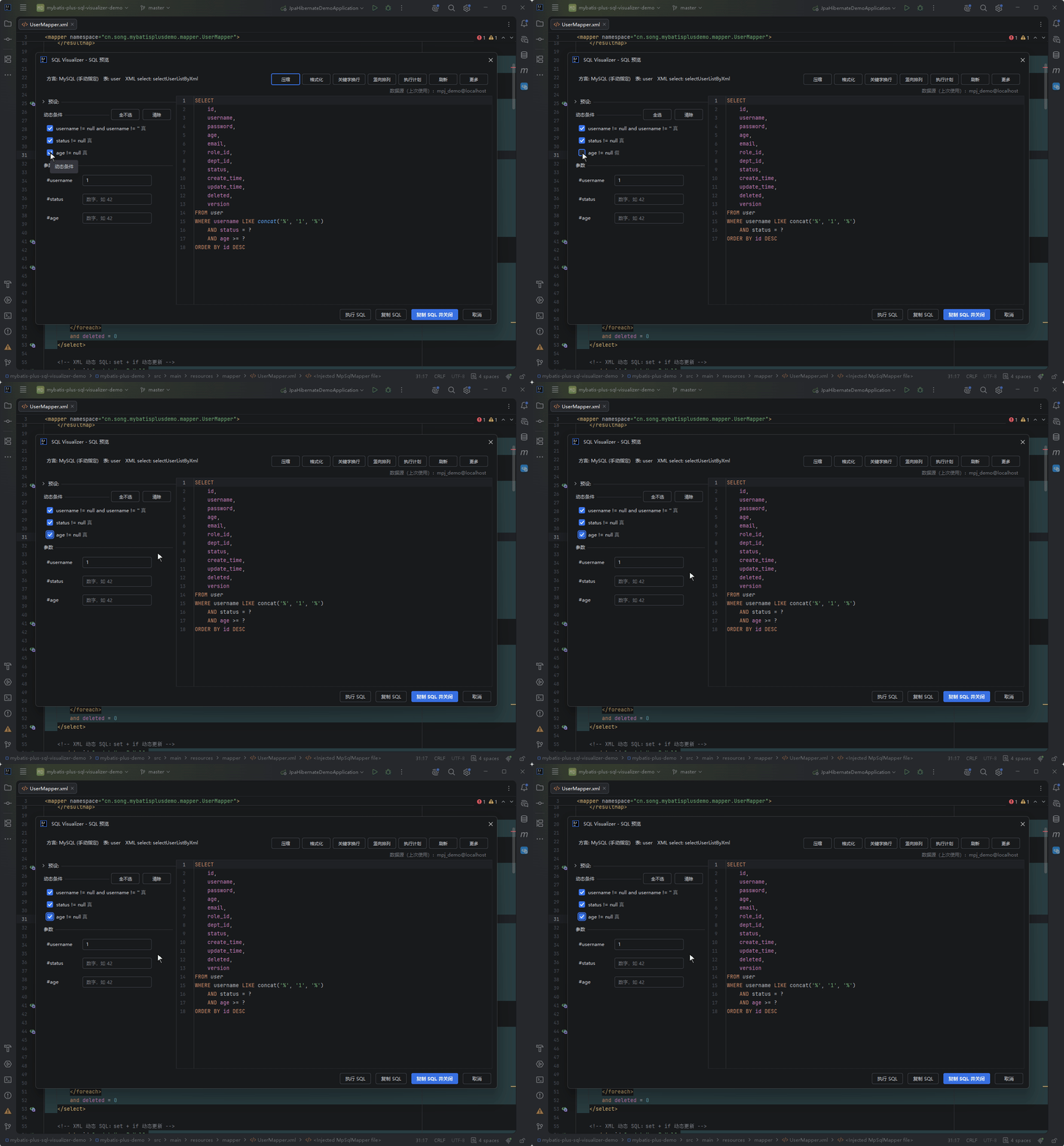
OGNL expressions in dynamic conditions (e.g. name != null and name != '') can be toggled in the left panel, with SQL updating in real time.
When an if test fails to evaluate, the preview no longer silently expands it as true — a visible error is recorded ("expanded as true; override with the panel toggle"), putting the divergence between preview and runtime on the table.
Expression annotations (When to read: a dimmed annotation appears on a condition line)
Test expressions beyond the restricted OGNL surface get a dimmed annotation on the condition line: syntax outside the subset (ternaries, static method calls, new, etc.) is marked "unsupported expression form", while resolvable syntax containing runtime-degraded calls is marked "contains runtime-degraded calls"; hover for the concrete reason. Common shapes like list.size() and isEmpty() are never flagged — annotations are hints only, and neither the expansion behavior nor the toggle semantics change.
Example
<select id="selectActive" resultType="User">
    SELECT * FROM user
    <where>
        <if test="name != null and name != ''">
            AND name LIKE #{name}
        </if>
        <if test="status != null">
            AND status = #{status}
        </if>
    </where>
    ORDER BY create_time DESC
</select>
Rendered result (name toggled on, status off):
SELECT * FROM user
WHERE name LIKE ?
ORDER BY create_time DESC
${} Direct-Substitution Banner & Execution Confirmation
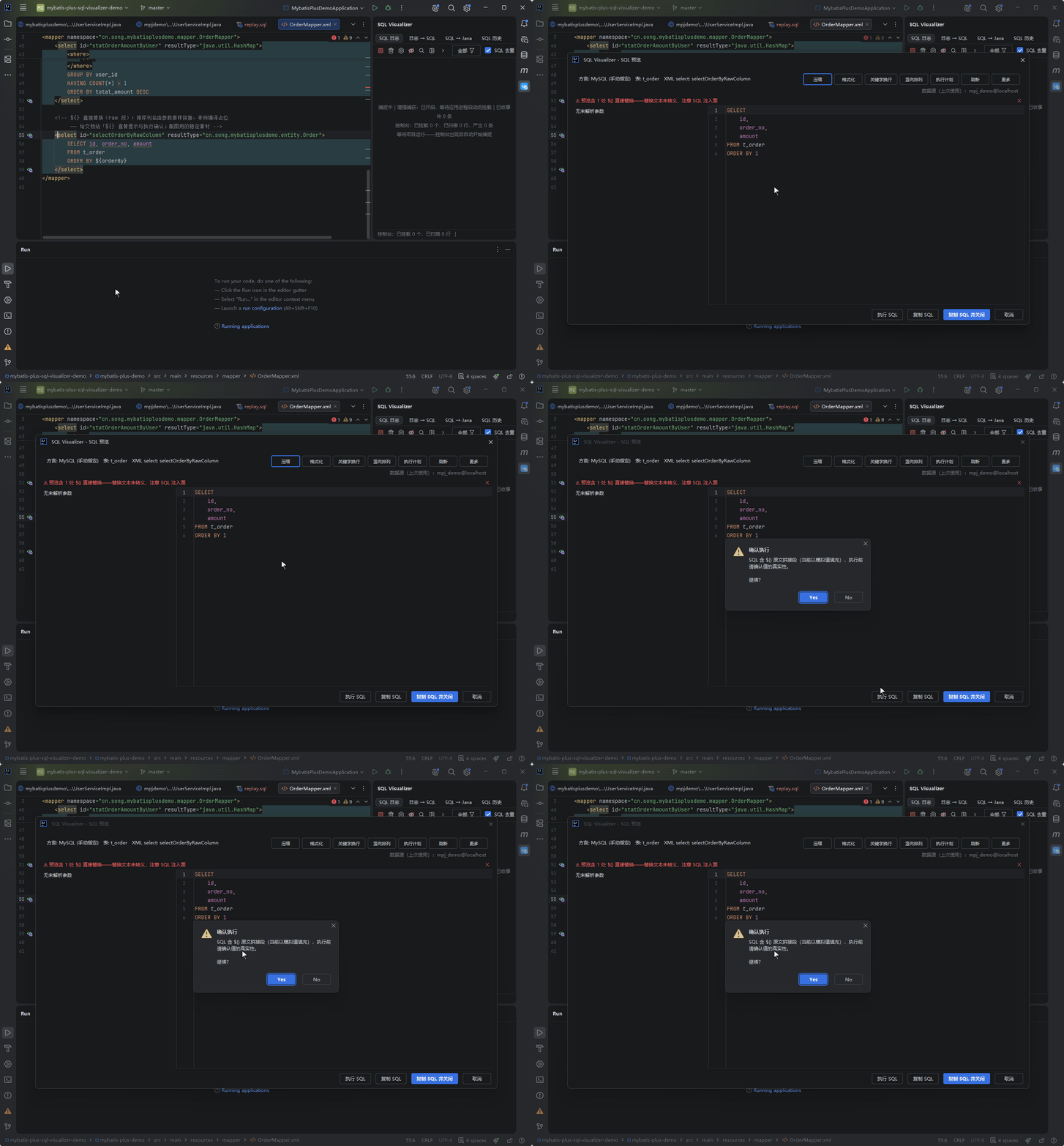
- When a preview contains
${}raw substitution, the panel shows a dismissible non-modal banner at the top ("preview contains N ${} direct substitutions — the text is not escaped, mind the SQL injection surface"); once dismissed it stays dismissed for the IDE session - "Execute SQL" and "EXPLAIN" pop a confirmation first, noting that raw segments are currently filled with mock values — choosing No aborts; after confirming once, the same panel won't ask again
- Copying executable SQL doesn't prompt; instead the output carries a
-- contains ${} raw segments (mock values)header comment so the risk travels with the artifact
Parameter Panel
Parameters are typed by signature into categories, and input rows show matching placeholder hints:
| Category | Placeholder hint |
|---|---|
| Number | 42 |
| Temporal | 2026-01-01 12:00:00 |
| Collection | [1, 2, 3] |
| Object | {"id": 1} |
Collection parameters split into multiple values by signature: for a direct IN (#{taskTypeList}) written without <foreach> on a @Param("taskTypeList") List<String> parameter, typing PI,WP renders IN ('PI', 'WP') instead of one lump value.
The "Empty parameter fill strategy" radio under "SQL Preview" in settings (Placeholder ? (default) / NULL literal / empty string) decides what a signature-typed parameter row yields when left empty. The default keeps the ? as a to-be-filled hint — NULL silently filters rows away (e.g. amount >= NULL never matches), which is easy to miss; switch to NULL / empty string when you need directly executable SQL.
Type recognition boundaries (When to read: a warning shows up or a mock value looks wrong)
- Invalid number or temporal input gets a dimmed warning at the end of the row — a hint, not a gate; the value still goes into the SQL as typed.
- Mock placeholder values are dispatched per category;
BigIntegercounts as a number andUUIDas text, and when a parameter's type can't be recognized you get a one-time notice before Execute / EXPLAIN (preview itself is not blocked). - Quoting follows the element kind (
List<String>quoted,List<Long>bare), and newlines or extra spaces betweenINand(are recognized as an IN shape too.
Execution Guards
- Unbounded-write findings list: the UPDATE / DELETE execution confirmation lists static-analysis findings when unbounded-write patterns hit — full-table without WHERE, always-true conditions (
1=1etc.), bare-wildcardLIKE '%'and more; with no findings the confirmation text stays unchanged - Execution timeout: the "Execution timeout" setting (seconds, default 30, 0 = unlimited) cancels the statement before reporting the error, so hung queries no longer sit in loading forever
- Error localization: execution errors are enriched with SQLState / driver error codes and the reported error position, and a "Locate failing statement" button jumps straight to that statement's start line in the preview source
- Disconnected DDL probing: when the connection drops while a CREATE-type DDL runs, the plugin probes in the background whether the object now exists and reports honestly ("exists" / "not detected") — "couldn't check" is never dressed up as "didn't take effect"
- Multi-statement confirmation: one-click execution of Log → SQL output runs a single statement directly, while multiple statements pop a candidate-selection overlay
\Gsuffix stripping: a MySQL CLI\Gsuffix (e.g.SELECT 1\G) pasted into the preview or console is stripped before execution; non-MySQL data sources are never stripped- Sessions & data sources: multiple same-named data sources no longer silently pick the first one; last-used memory matches by UUID exactly (renames don't break it), and shared consoles are identity-probed before reuse
Multi-statement and delimiter details (When to read: a stored-procedure script or multi-statement split goes wrong)
Stored-procedure scripts with custom delimiters (DELIMITER $$) are collected per delimiter instead of being split at every top-level ;; IME-stray full-width parentheses (( / )) in a statement count on the same depth stack as half-width ones, so mixed-pair statements are no longer split into two or merged with the statements after them. \G suffix stripping leaves comments and string literals untouched, and history keeps the original text.
Preview execution, Log → SQL execution and rollback execution share the same confirmation and guard chain.
Rollback SQL
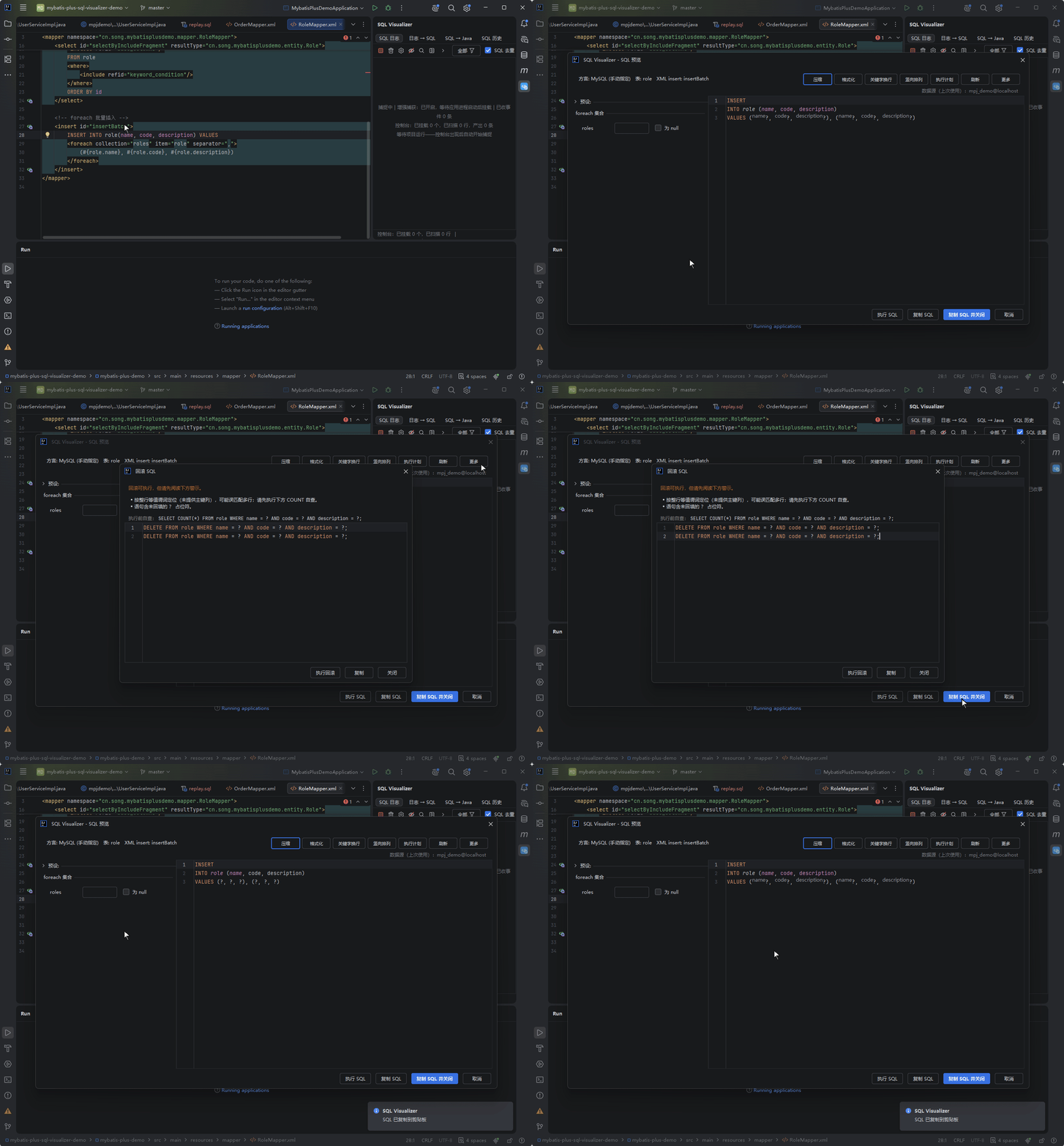
"Rollback SQL" (the first item in the preview panel's "More" menu) derives inverse SQL for the currently previewed statement; the dialog states up front whether that derivation can be trusted, then shows the output to copy.
INSERT: Auto-Generated Rollback
INSERT is the only statement type that gets an automatic rollback: each VALUES row yields DELETE FROM table WHERE … with an equality predicate on every column of that row (NULL renders as IS NULL).
The plugin reads no database metadata, so it has no primary key and the predicate is the whole row — which can match more than one row. The dialog warns about that and offers a SELECT COUNT(*) FROM table WHERE … check to run before executing, and flags any ? placeholders left unfilled separately.
INSERTs without a column list (column names unknown), INSERT … SELECT (pre-execution data unknown) and upserts (they may have modified existing rows, so a DELETE cannot undo them) are refused outright.
UPDATE / DELETE: Generated from Pasted Query Results
UPDATE and DELETE get no automatic rollback. The plugin has only the SQL text, never the pre-execution values (no before-image), so a derived statement would also wipe out later changes by others.
The dialog says so plainly ("UPDATE cannot be auto-rolled back: original values are unknowable." / "DELETE cannot be auto-rolled back: the deleted data is unknowable."), points to binlog, flashback or backup restore for manual recovery, and offers a snapshot query SELECT * FROM table [WHERE original WHERE]:
- Click "Run snapshot query" — it goes through the read-only side channel (it does not touch the shared console and does not replace the SQL you are looking at), and the result table shows up right in the dialog
- The result is filled in automatically and the rollback statement is generated immediately — no manual copy-paste: a DELETE original becomes an INSERT that backfills every column, an UPDATE original becomes a reverse UPDATE that also puts the written new values into the WHERE clause as an optimistic-lock check, so it only rolls back while the database still holds the written state
- If you want to hand-tune it, switch to the Text view, edit, then click "Generate rollback from pasted result" (this is the fallback path, not the normal one)
The snapshot result supports table / text dual view switching. In table view you can also sort by clicking a column header, drag column widths, "fit columns" in one click, copy a cell / row / column / everything from the context menu, and take the TSV away with Ctrl+C; on Ultimate you can additionally "Open in CSV Editor", which sends the snapshot into the IDE's native CSV table for viewing and editing (on Community it opens as a text editor).
The snapshot query goes through the read-only side channel and never replaces the SQL in the preview editor; with no data source bound a picker opens directly and the query retries once you choose one.
When the snapshot statement's dialect does not match the target data source, the dialog offers the same kind of exits: re-render for the target dialect and retry, or switch to another data source.
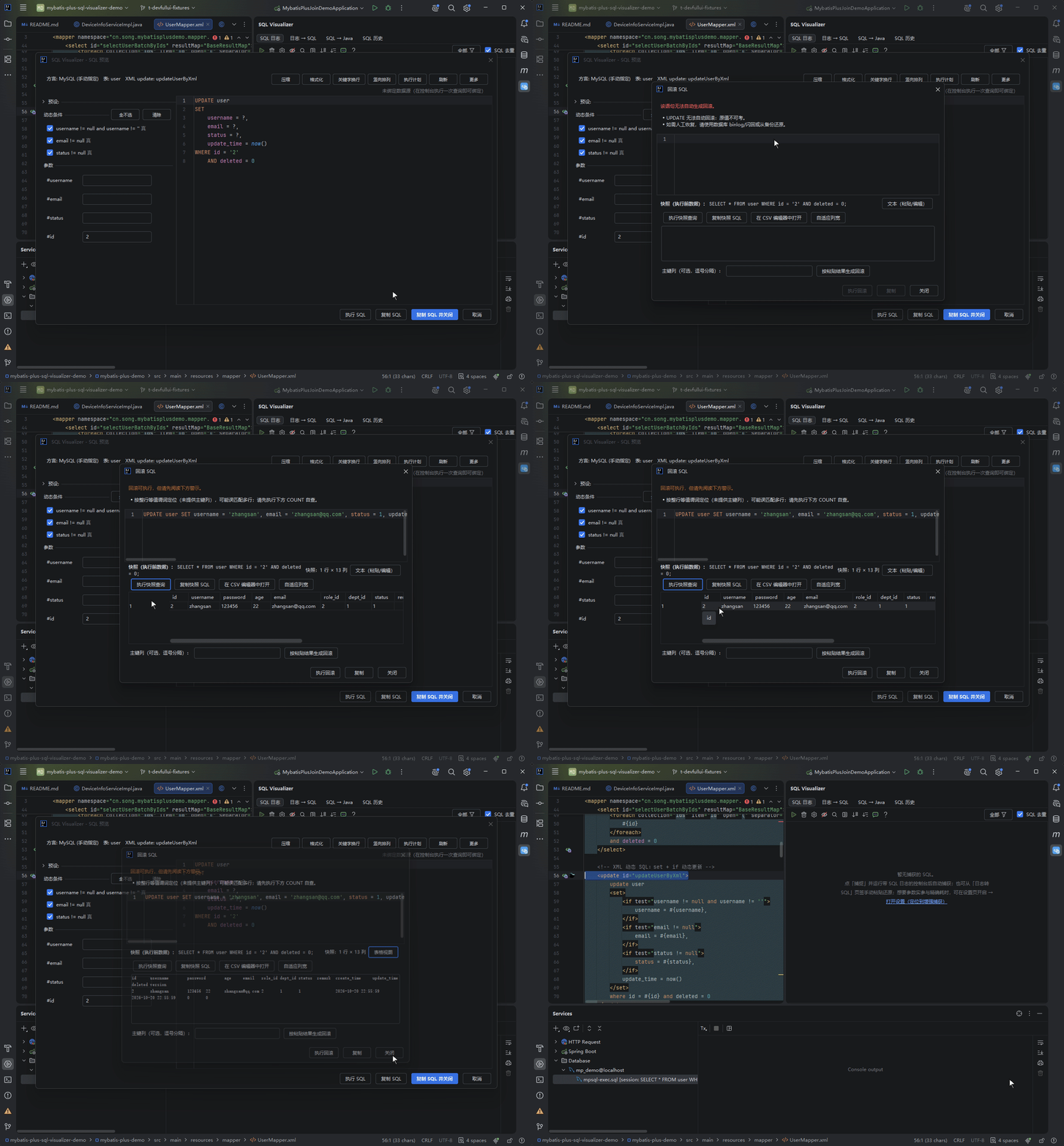
Primary-key columns can be filled comma-separated in the input box and apply to UPDATE originals: fill them to locate rows by primary key, leave them empty to mirror the whole old row. Rows or statement volume beyond the limits are truncated with a notice, and "Execute rollback" and "Copy" stay disabled until something has been generated.
Other Statements and Multi-Statement Judgement
Other statements (SELECT, MERGE, DDL and so on) do not open the dialog at all — they get a message box explaining why. A multi-statement preview is judged as a whole: if any statement is not derivable, no partial rollback is produced, since a half rollback is more dangerous than none.
SQL Quick Templates
Select text in a mapper XML or the preview editor and use the "SQL quick templates" context-menu group to run EXPLAIN / COUNT / a 10-row sample in one click, going through the native Database console chain. These three actions ship without default shortcuts; bind your own in Settings > Keymap or in the plugin's "Shortcuts" settings section.
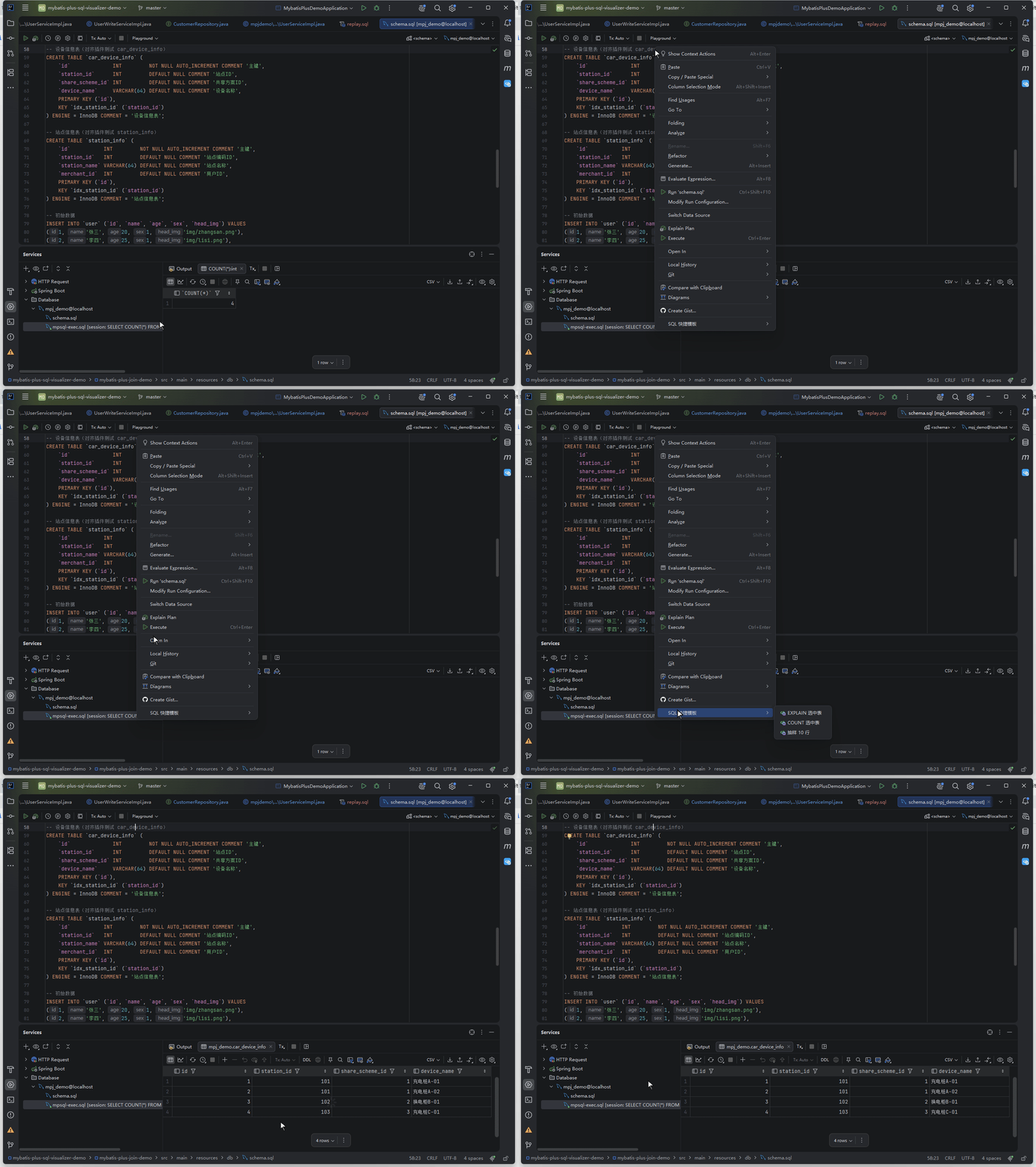
The selected text is used verbatim as the table name (no identifier validation, and no check of which database it belongs to) — selecting a fragment works too, but if the table is not in the currently bound database the execution fails; the failure message carries the current database and data source (e.g. [当前库=mpj_demo, 数据源=mpj_demo@localhost, 数据源默认库=mpj_demo]), which tells you whether to switch database or table. On failure the balloon offers "Locate error statement" and "Copy error message", the same actions the preview panel's Execute SQL failure provides.
Render Annotations & Degradation Banners
- In vertical layout, each UPDATE SET item gets a trailing "column (new) = expression" annotation (self-referencing forms like
a = a + 1read as the new value as-is), making old-vs-new comparison easier - For multi-column dynamic INSERT, the preview labels each VALUES expression / SELECT projection with inlay hints showing the target column name — column-value misalignment is visible at a glance (suppressed when the projection already carries a same-name alias, or when it can't be judged statically)
- The preview panel and the Log → SQL panel embed non-modal degradation banners saying which part wasn't restored, why, and what you can do about it — no more silent truncation
HQL / JPQL Preview
The plugin also previews Hibernate HQL and JPA JPQL statically. Entries appear as gutter icons on the left of Java source lines:
| Entry | Location |
|---|---|
Hibernate HQL calls (session.createQuery(hql) etc.) | The HQL string line |
@Query("...") annotations (JPQL, incl. @Modifying DML) | The annotation line |
| JPA Repository derived methods and CRUD methods | Method declaration / call line |
HQL strings split across multiple lines with +, or concatenated via chained assignments, are recognized as well — the gutter icon still appears.
The remaining entry points (@NamedQuery named queries, JPA CriteriaQuery chains, custom DAO HQL query methods, .hbm.xml mapped entities) trigger previews too.
For the full trigger surface and capability set (Repository CRUD write paths, derived queries, Specification, QueryByExample, pagination & sorting), see JPA / Hibernate SQL Preview.
SELECT Entity Alias Expansion
In HQL semantics, SELECT u means "fetch the whole entity u", but emitting it verbatim makes MySQL fail with [1054] Unknown column 'u' in 'field list'. The plugin expands bare entity aliases into the entity's column list automatically:
-- HQL: SELECT u FROM User u WHERE u.status = 1
-- After expansion:
SELECT u.id, u.name, u.status, ... FROM user u WHERE u.status = 1
Expansion rules:
- Only bare aliases registered in FROM / JOIN are expanded; DELETE / DISTINCT / subqueries / aggregates / explicit column lists are untouched
- When the query has no SELECT clause, the column list is added automatically
- Falls back to
alias.*when a JOIN side table or entity metadata is missing
Have a suggestion or hit an issue with this feature? Go to the feedback pool