


MCP Server: SQL Tools for AI Agents
The plugin registers eleven tools with IDEA's built-in MCP Server, letting external agents such as Claude Code, Cursor, JetBrains AI Assistant, Codex, ZCode and DeepSeek Harness call the plugin's SQL capabilities directly: render executable SQL, inspect table structures, fetch execution plans. You keep writing code in the IDE as usual while the agent works alongside — neither side interrupts the other.
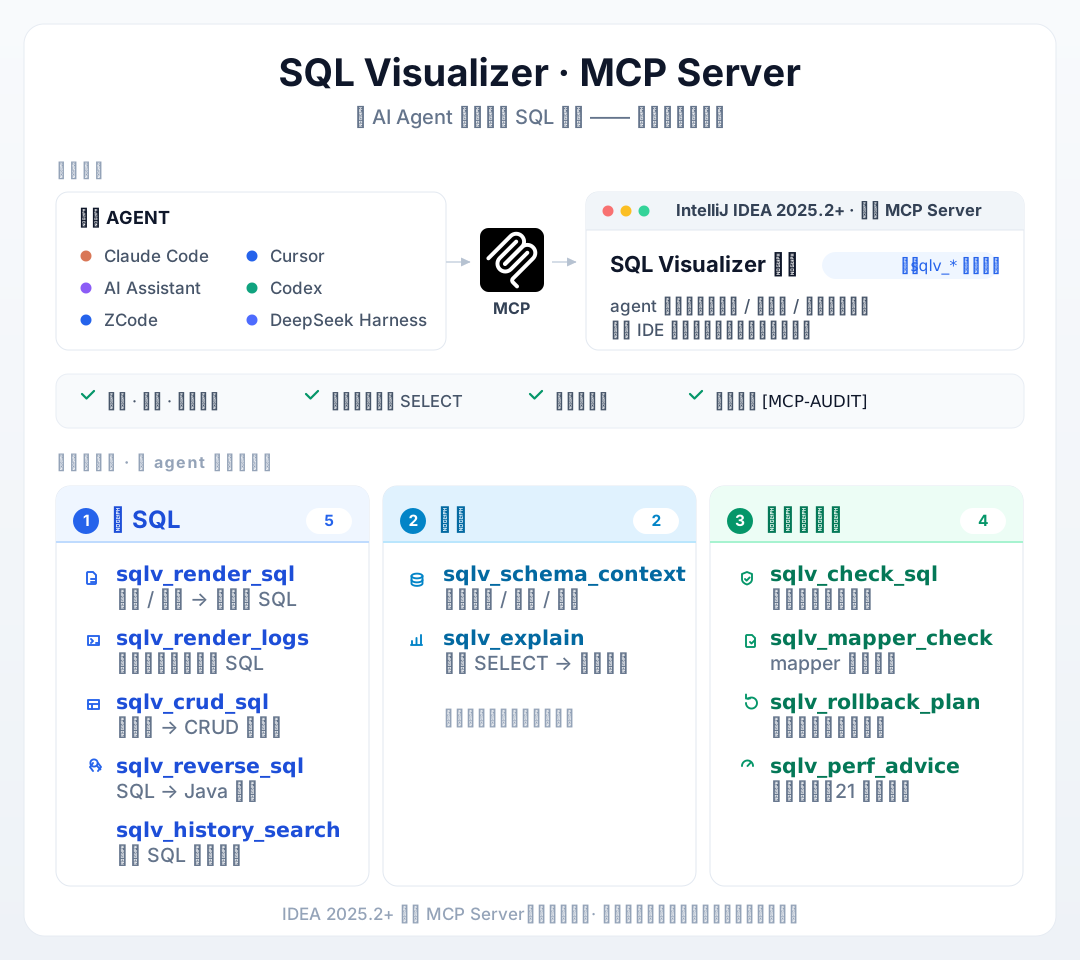
Quick Start
- Make sure you run IDEA 2025.2 or later — the MCP Server is built into the platform, nothing extra to install
- Add the IDE's MCP Server connection in your MCP-capable agent (e.g.
use_idea_mcpin Claude Code); the elevensqlv_*tools show up in its tool list - Call them. Feed a mapper XML fragment to
sqlv_render_sqland you get real executable SQL back — parameters filled in, ready to run
No project code changes, no extra plugin configuration. To control which tools the agent can see, see "Settings and Gating" below.
The Eleven Tools
Grouped the way an agent works: get the SQL first, then understand the database, then check before execution.
Get the SQL
| Tool | Input | Output |
|---|---|---|
sqlv_render_sql | filePath + line (project-relative, or absolute inside the project), or paste a mapper XML fragment as xmlSnippet; paramsJson when an external template renderer is configured | Real executable SQL — parameters filled in, with notes wherever rendering degraded |
sqlv_render_logs | logText, the raw console log (optional custom sqlPrefix / paramPrefix etc.) | Executable SQL restored from MyBatis / Hibernate / JdbcTemplate logs |
sqlv_crud_sql | filePath or className of a MyBatis-Plus entity | INSERT / UPDATE / SELECT / DELETE set |
sqlv_reverse_sql | sql, one SQL statement | MyBatis-Plus Java code generated in reverse |
sqlv_history_search | Four-way filters — keyword / regex / time range / source file (today only by default; allDates=true searches everything) | Match summaries and hit counts from the persisted SQL history (timestamp, SQL preview, source location, duration, mapper statement id), newest first, capped — never a full dump |
Understand the Database
| Tool | Input | Output |
|---|---|---|
sqlv_schema_context | tables, a list of table names (optional dataSource, maxTables — default 8, cap 20) | Compact context of the data source's real columns, types and comments |
sqlv_explain | selectSql, a single SELECT (optional dataSource; omit dialect to auto-detect from the data source URL) | EXPLAIN plan text dispatched by dialect, with driver notices and index hints; Dameng uses EXPLAIN FOR and returns a 19-column plan table |
Check Before Execution
| Tool | Input | Output |
|---|---|---|
sqlv_check_sql | sql, one SQL statement | Static write-risk and type check results |
sqlv_mapper_check | mapper XML as xmlSnippet or filePath, optional simulate | Mapper contract check; simulate mode analyzes rendered output for write risks and performance — evidence no static verifier can produce |
sqlv_rollback_plan | sql, one INSERT / UPDATE / DELETE (optional primaryKeyColumns) | A rollback plan — produced only, never executed |
sqlv_perf_advice | sql, one SQL statement | Advice from 21 built-in rules, capped at 30 entries and trimmed by severity when over |
Verifiers Give Confidence, MCP Gives Evidence
The plugin's checks and hints produce confidence scores — "might be risky", "worth a look". The MCP tools take a different route: they hand the agent the actual executable SQL produced by the rendering chain. The agent doesn't have to guess; it edits code with evidence in hand.
For example, sqlv_mapper_check goes beyond static contract checking and can also analyze rendered output for write risks and performance — empirical evidence no static verifier can produce.
A Typical Workflow
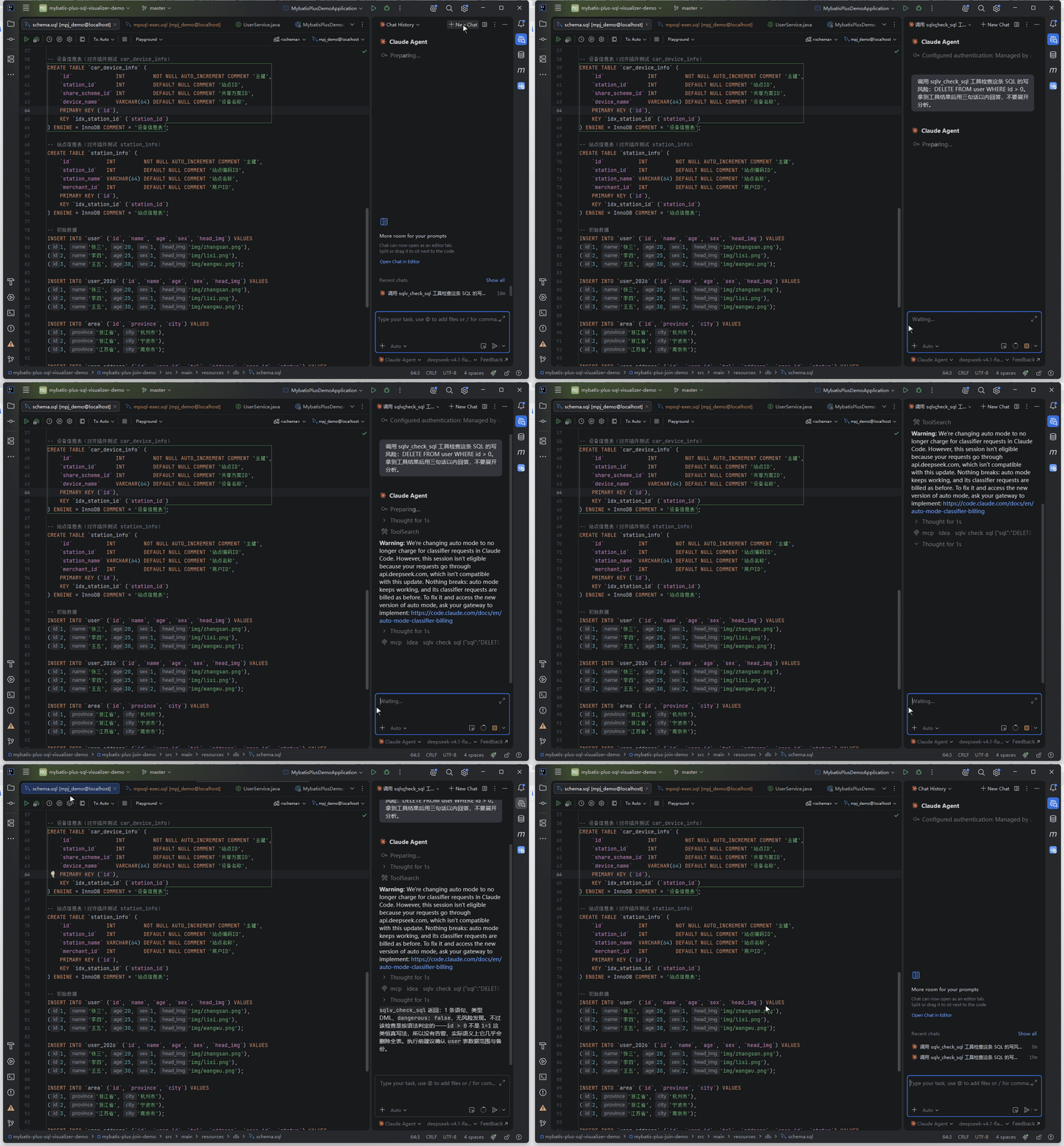
Take "have the agent diagnose a slow SQL" as an example — the agent chains these tools as needed:
sqlv_render_sqlfetches the real executable SQL by file and line (parameters filled in, not the?placeholders in source)sqlv_explaingets the plan for that SELECT — if the tail hits full-table scans, filesort and similar patterns,index hintsare appendedsqlv_perf_adviceruns the 21-rule advisory;sqlv_schema_contextpulls the table's column comments and structure as supporting evidence- After the fix,
sqlv_render_sqlre-renders to verify; before touching a write statement,sqlv_rollback_planprepares a rollback plan
Every step is deterministic output: the SQL is a real rendering-chain product, the plan comes straight from the database, the advice traces back to rules — no "gut feeling" involved.
Usage Notes
| Tool / Scenario | Behavior |
|---|---|
sqlv_render_sql | One statement per call; when a location has multiple candidates it takes the first and says so — multi-statement logs belong to sqlv_render_logs |
The three tools that take filePath (sqlv_render_sql / sqlv_crud_sql / sqlv_mapper_check) | Path semantics are identical across all three: project-relative paths (relative to the project root, e.g. src/main/resources/mapper/UserMapper.xml) and absolute paths inside the project are both accepted; paths outside the project and .. traversal are rejected |
sqlv_schema_context / sqlv_explain | With several data sources configured, pass dataSource explicitly — when the intended data source isn't connected and introspected in the Database tool window, same-named tables may resolve from a different one; a successful sqlv_schema_context response discloses the data source it hit on the first line (source: …), marked auto-resolved with a pin hint when dataSource was omitted — follow the hint to pin the intended database |
sqlv_render_logs / sqlv_rollback_plan / sqlv_mapper_check | Statement headers carry the statement name (taken from a leading -- Name: log comment), keeping multi-statement output readable at a glance |
sqlv_perf_advice | Overly long entries are truncated — no unbounded output |
sqlv_explain data source | Relational databases only. When the data source URL belongs to a non-SQL family (jdbc:redis://, jdbc:mongodb:// and the like) it returns NOT_A_SQL_DATASOURCE instead of guessing a dialect and firing away — sending EXPLAIN to Redis only yields a driver error that points you in the wrong direction |
sqlv_explain on Dameng | The plan statement is EXPLAIN FOR <sql>: a bare EXPLAIN returns no result set at all on DM8 (measured), while EXPLAIN FOR yields a 19-column structured plan table. Don't hand-build an EXPLAIN prefix when reproducing a plan |
sqlv_render_sql and custom templates | When the project's SQL lives outside the MyBatis ecosystem (root <sqls>, statements as <sql id="…">, :named parameters — a home-grown template format), configure a render command under "External SQL Template" in Settings: it receives the template path, the statement id and paramsJson and returns the SQL. Without it those locations keep returning SOURCE_NOT_FOUND |
Error codes
Failures come back as structured [CODE] message text — no platform exception, no dialog in the IDE — so the agent can decide on its own whether to retry or change course:
| Code | Meaning |
|---|---|
MCP_READ_ONLY | The statement itself writes — entries that hit the database only accept SELECT; this is the first structural verdict |
SQL_BLOCKED | Statement shape rejected: multiple statements, locking reads (FOR UPDATE / FOR SHARE), SELECT … INTO, or a parse failure (if it can't be judged, it is refused rather than allowed) |
INVALID_ARGUMENT | Missing or malformed arguments (incomplete path, line out of range, unknown dialect name, …) |
DATASOURCE_NOT_FOUND | The data-source alias doesn't match, or the project has none yet; the message lists the available names |
NOT_A_SQL_DATASOURCE | The target data source isn't a relational SQL database (Redis / MongoDB style URL sub-protocols); the message carries only the sub-protocol, never credentials |
DATASOURCE_UNREACHABLE | Connect or execute failed (unreachable, authentication failure, …) |
SCHEMA_NOT_AVAILABLE | No metadata for the table in any data source (source not connected, or introspection unfinished) |
DIALECT_UNSUPPORTED | No EXPLAIN rendering for the current dialect |
SOURCE_NOT_FOUND | No recognisable SQL source at the given location: not a statement line, path outside the project, file missing, or a template format the plugin doesn't support yet |
EXTERNAL_RENDER_FAILED | External template rendering failed — invalid command template, launch failure, timeout, non-zero exit or empty output; only possible once "External SQL Template" is enabled |
TOOL_DISABLED | The tool is disabled in Settings; an external session that remembers the tool name and calls it directly gets this code too, and no tool logic runs |
PROJECT_NOT_READY | Project indexing unfinished or the project is closing — retry shortly |
Requirements
- IDEA 2025.2+: the MCP Server is built into the platform, nothing extra to install
- IDEA 2026.1.x: as of v2026.10.29 the plugin registers its filter through that version line's tool-filter contract, and the MCP Server works as expected (older plugin versions made the platform's MCP service unavailable overall on that line — upgrading the plugin fixes it)
- IDEA 2024.3 ~ 2025.1 do not support this feature set (the platform has no built-in MCP Server); all other plugin features are unaffected
- Environments without the MCP Server plugin see zero impact: the plugin's MCP registration is not loaded at all, and every other feature works as usual
Settings and Gating
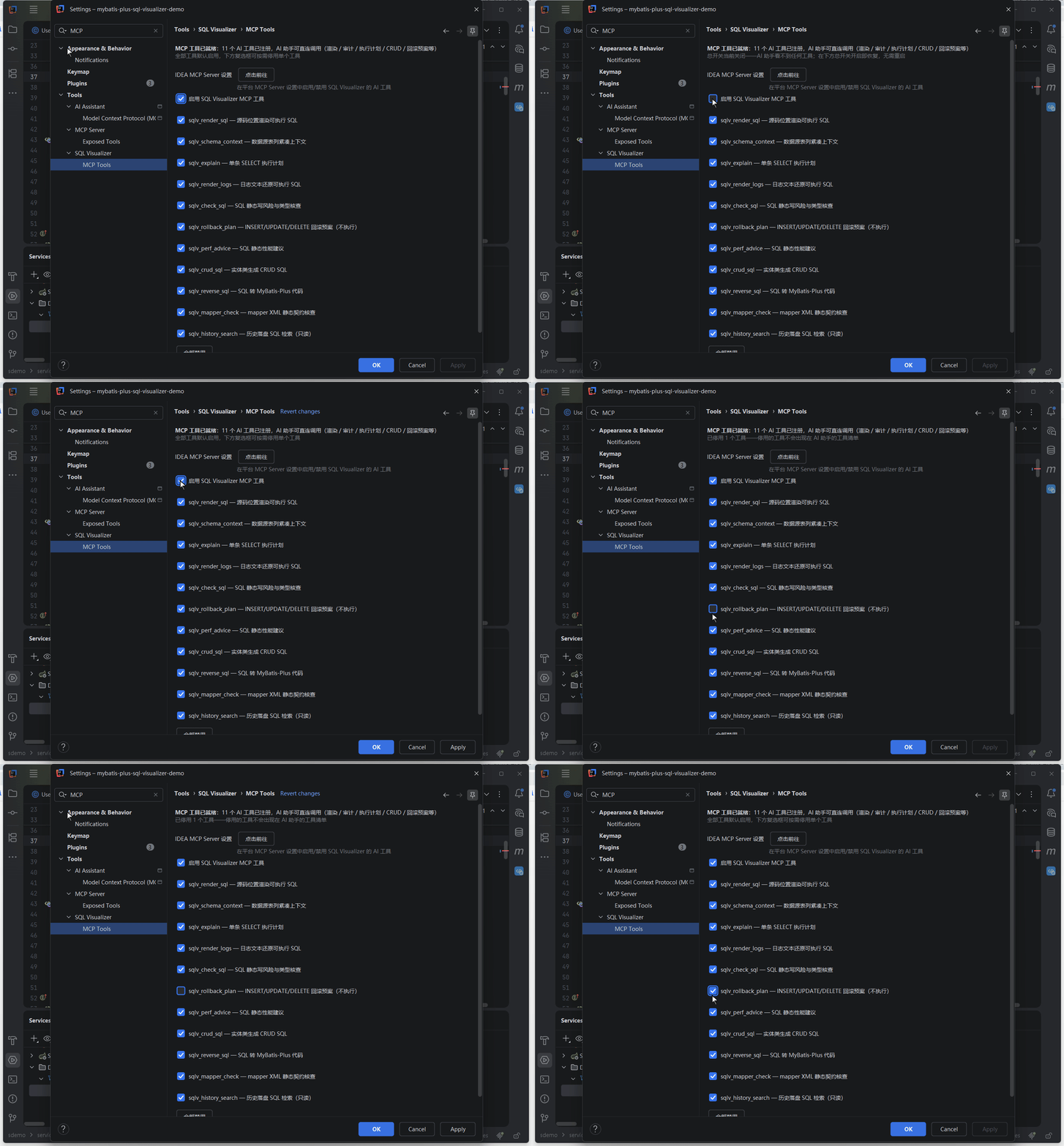
Settings → the "MCP Tools" page provides a gating area:
- Master switch: enable or disable the plugin's MCP functionality as a whole
- Per-tool enable / disable for all eleven tools
- "Enable all" / "Disable all" shortcuts
Every change takes effect immediately: the next tool-list refresh or tool call follows the new configuration — no IDE restart needed.
Disabling is not just "disappearing from the list": the shared execution entry re-checks the switches before every call — an external session that remembers a tool's name and calls it directly gets a TOOL_DISABLED error, and no tool logic runs.
Relationship with the platform MCP switch (When to read: the agent still sees other tools after you turn off the plugin's switch, or you want to shut down the MCP service entirely)
These switches only control whether the plugin's eleven tools are visible to the agent. They are independent of the "Enable MCP Server" toggle under Tools → MCP Server — the latter is the master switch for the platform's built-in MCP service (127.0.0.1:64342), which also serves tools from other plugins and the platform itself. Turning off the plugin's switch leaves that service running: through the platform's tool-filter extension (mcpToolFilterProvider), the plugin removes the sqlv_* tools from the agent's tool list — effective at the next listing refresh or new session, visible to connected clients once they refresh.
Read-Only and Safety
All eleven tools declare themselves to the agent as read-only, idempotent and non-destructive — safe to let the agent call them autonomously. On top of that:
- SELECT whitelist: entry points that hit the database accept SELECT only — structural judgment plus keyword scanning as two independent checks; anything undecidable is rejected rather than allowed through. String literals are stripped before checking so keywords inside literals can't cause false passes
- Zero dialogs: the MCP call chain never pops a dialog in your IDE — non-compliant requests come back to the agent as error messages, and database connections never prompt for passwords
- Audit trail: every tool call writes an
[MCP-AUDIT]entry to the IDE log (idea.log)
Plan and Advice Output
Outputs that touch the database carry a few extras:
| Tool | Extra information |
|---|---|
sqlv_explain | Stale driver messages are drained from the connection before executing; PostgreSQL NOTICE / WARNING messages come back alongside the plan in a notices section; the plan tail appends index hints for common inefficiency patterns (full scans on large tables, filesort / temporary, PG Seq Scan) — advisory only, never modifies or executes |
| Database-backed queries | Queries against non-existent tables (AI-generated hallucinated table names are a frequent case) are negatively cached per data source for 30 seconds, so long sessions don't re-scan the whole database for the same phantom name |
Suggestions or issues with the MCP tools? Feedback pool