


Batch Operation Panel
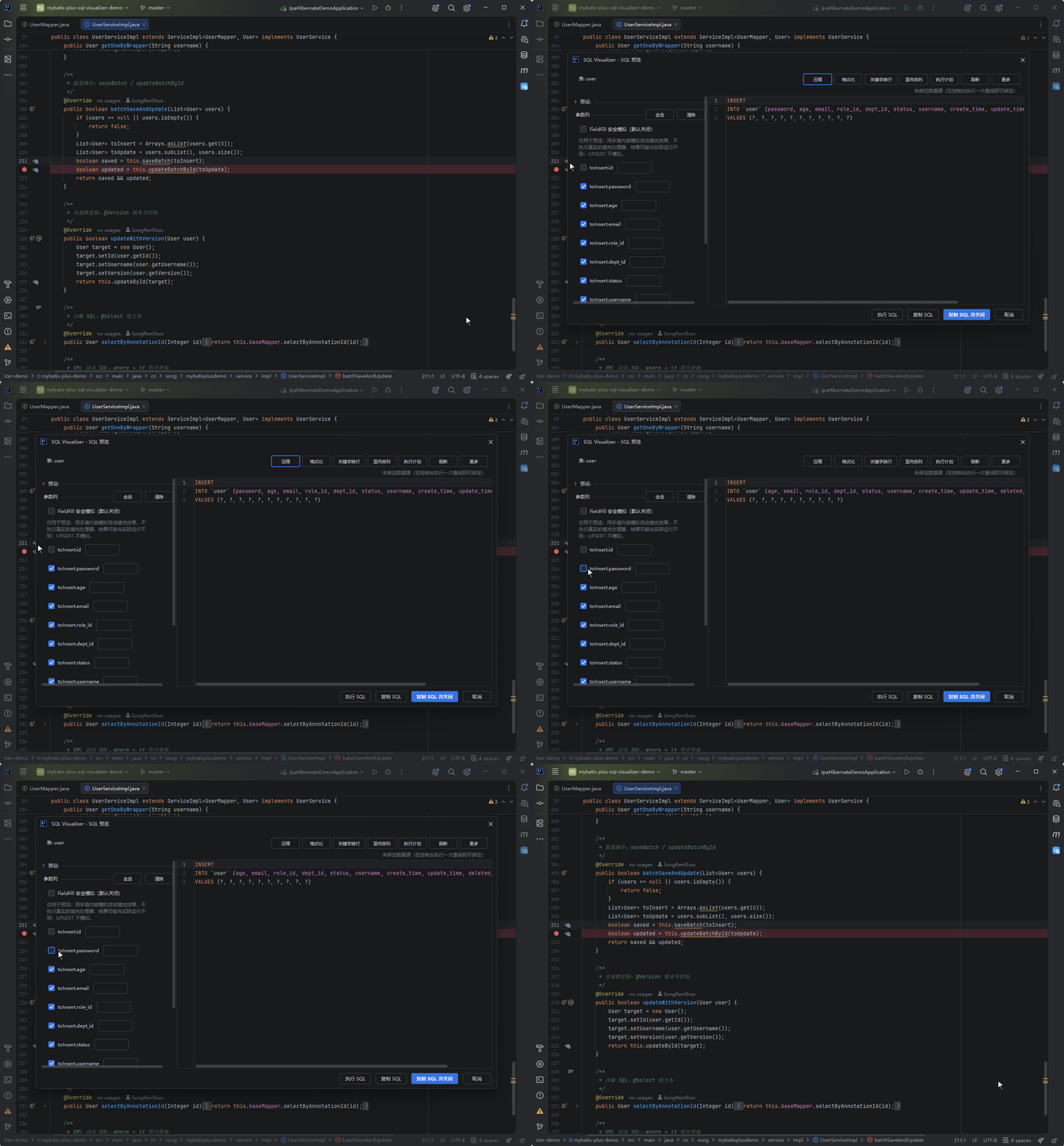
save / updateBatchById / saveOrUpdate etc. — batch SQL expanded by column, with per-column parameter toggles.
Trigger Method
When the Wrapper anchor involves batch operations, the dialog auto-switches to the batch parameter panel.
Supported Batch Methods
| Method | Type | Description |
|---|---|---|
save | INSERT | Single insert |
saveBatch | INSERT | Batch insert |
updateById | UPDATE | Update by ID |
updateBatchById | UPDATE | Batch update by ID |
saveOrUpdate | UPSERT | Insert or update (conflict clause per dialect) |
saveOrUpdateBatch | UPSERT | Batch insert or update |
Parameter Panel
Column-Level Toggles
- INSERT: All columns toggleable (auto-increment PK default off, aligning with MP runtime behavior)
- UPDATE: SET columns toggleable, WHERE PK + @Version fixed (cannot be unchecked)
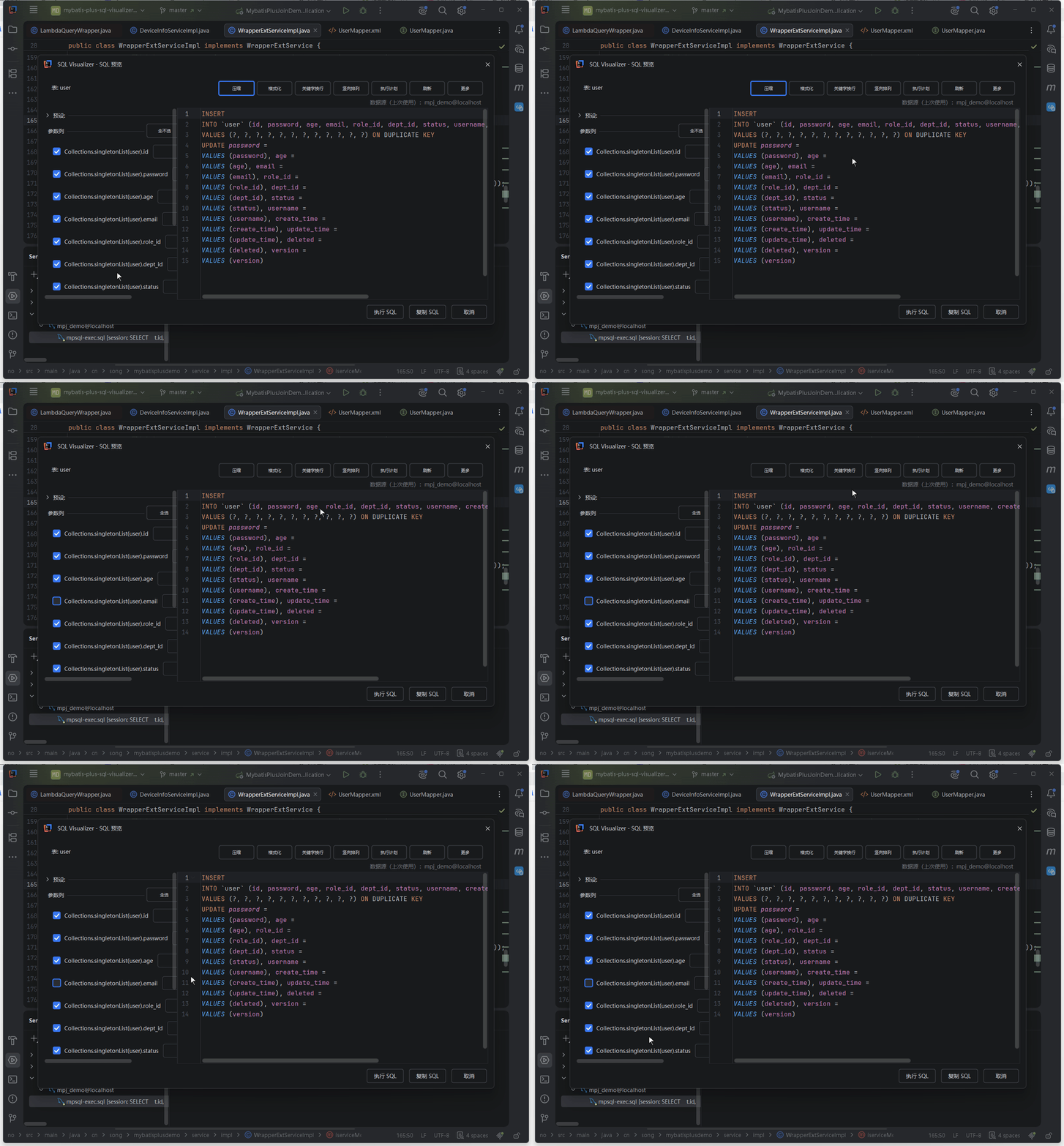
- UPSERT: All columns including PK toggleable
For saveOrUpdateBatch, the per-column toggles and the conflict clause move together: uncheck a column in the "Parameter Columns" list on the left and it disappears from both the INSERT column list and the ON DUPLICATE KEY UPDATE section.
Quote Fill-in
Auto-determine quoting by field type:
- Numeric (Integer / Long / BigDecimal etc.) → no quotes
- String / datetime types → quoted
- Unknown type → panel NUMBER_REGEX heuristic
Conflict Clause (UPSERT)
| Dialect | Conflict Clause |
|---|---|
| MySQL / MariaDB / OceanBase (MySQL mode) | ON DUPLICATE KEY UPDATE |
| openGauss | ON DUPLICATE KEY UPDATE (not PG's ON CONFLICT) |
| GaussDB | ON DUPLICATE KEY UPDATE (same as openGauss) |
| PostgreSQL / KingBase / SQLite / HighGo / Vastbase | ON CONFLICT (key) DO UPDATE SET (both forms verified on Vastbase A-mode; PG form chosen) |
| H2 | Whole statement: MERGE INTO t (cols) KEY (key) VALUES (...) |
| Oracle / SQL Server / DM (Dameng) | No native concise form; degrades to a plain INSERT |
SQL Server, Oracle and Dameng do support MERGE INTO, but that is a complete multi-branch statement and cannot be appended as an INSERT conflict suffix. The plugin therefore emits a plain INSERT that is executable on that dialect rather than an incomplete MERGE.
Batch Execution and Confirmation
When a multi-statement product restored by Log → SQL is executed in one click, a single statement runs directly; multiple statements pop up a candidate-check list to confirm before executing.
For multiple same-table equality deletes restored from a foreach batch delete, the confirmation popup shows a one-line merge hint: "Detected N same-table equality deletes that could be merged into DELETE ... WHERE id IN (...)". This is a preview hint only — execution still runs each statement as-is; with heterogeneous statements mixed in, the count is disclosed honestly as "N of M".
FieldFill Safe Simulation
When an entity field carries @TableField(fill = INSERT / UPDATE / INSERT_UPDATE), the parameter panel shows a [fill=…] badge after that field name, telling you the runtime MetaObjectHandler will write a value into that column:
![FieldFill safe simulation: ticking FieldFill Safe Simulation makes a Simulated value row appear under fields tagged [fill=INSERT]; typing a value makes the SQL take that value while the normal parameter box for the same field greys out](/demo/fieldfill-simulate.gif)
- The simulated-value row only appears when "FieldFill Safe Simulation" is ticked (the checkbox is off by default); the badge is always shown, as a reminder that "this column isn't yours to fill at runtime"
- Once a simulated value is entered it wins, and the normal parameter box for that field greys out; clear the simulated value to go back to hand-filling
- Only active INSERT / UPDATE write columns are covered; WHERE conditions and UPSERT are never guessed
- Numeric columns accept digits only, no semicolons or scripts; invalid input keeps the placeholder and says so
The boundary, stated plainly: simulation is for preview only and never runs your MetaObjectHandler — it builds SQL from what you typed, so the result may differ from real execution. To match runtime exactly, look at what the application actually executed (enhanced capture in the SQL Log tool window).
Have a suggestion or hit an issue with this feature? Go to the feedback pool