


Wrapper → SQL Preview
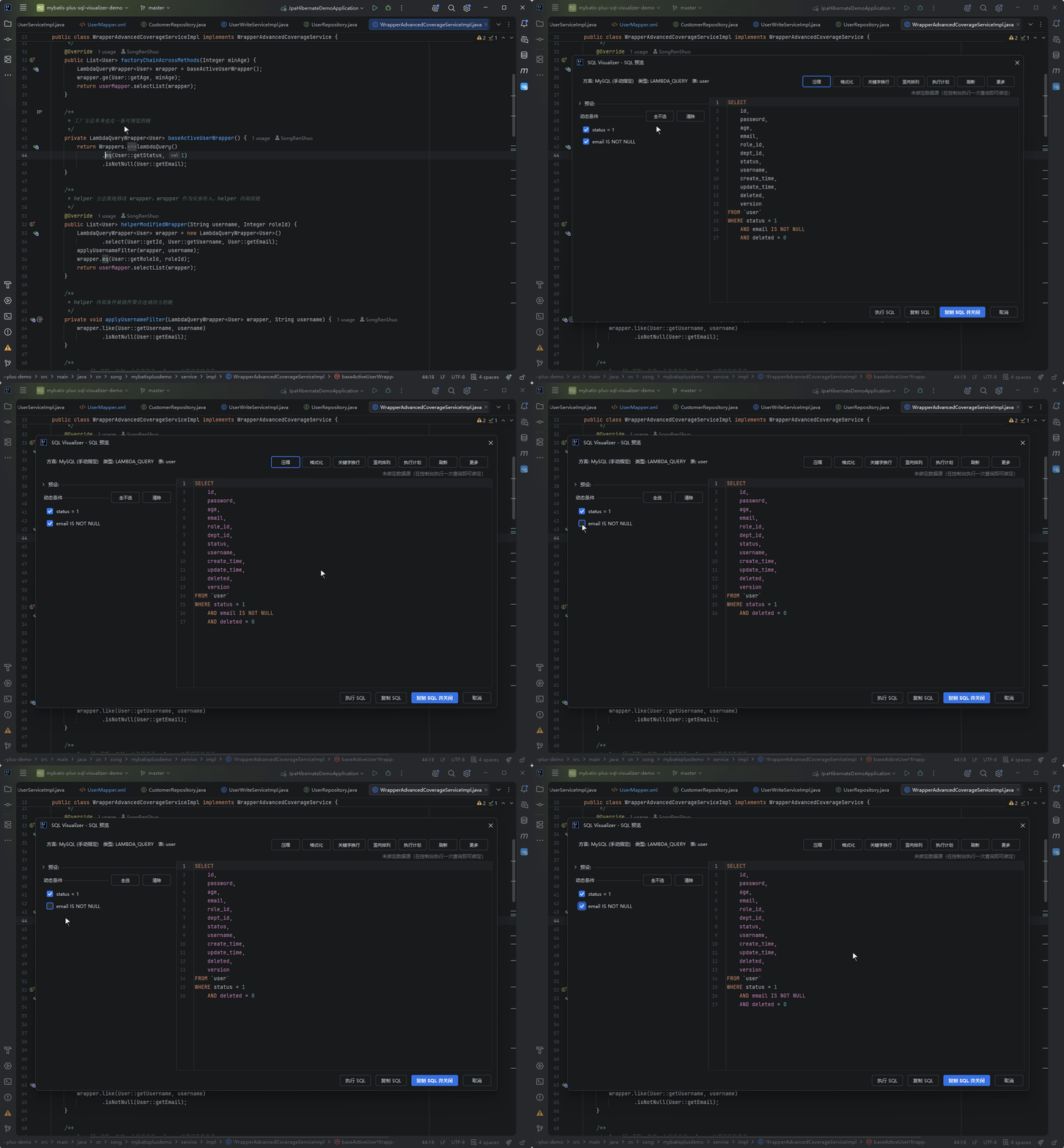
Statically parse MyBatis-Plus / MPJ calls in Java source code into previewable SQL — no need to launch the project or connect to a database.
Trigger Methods
| Method | Action |
|---|---|
| Gutter icon | Left-click the icon at the Wrapper anchor line to preview instantly; right-click for a menu with "Preview SQL" and "Recent Executions" |
| Right-click menu | Place cursor on Wrapper → Right-click → Convert to SQL |
| Shortcut | Alt+Shift+Q (macOS Option+Shift+Q) |
Other preview icons (annotation SQL, XML, JPA/HQL, and more) keep the single-click-to-preview behavior.
Supported Wrapper Types
LambdaQueryWrapper/LambdaUpdateWrapper/LambdaDeleteWrapper- String-based
QueryWrapper/UpdateWrapper/DeleteWrapper MPJLambdaWrapper/MPJQueryWrapperJOIN queriesservice.lambdaQuery()/service.lambdaUpdate()and similar service chains
Other ORM / JDBC Styles Supported
Also triggered by inline gutter icons, with the same preview experience:
| Style | Example |
|---|---|
| JdbcTemplate string SQL | jdbcTemplate.queryForList("select * from user where id = ?", 1L) — named params :name filled by name, StringBuilder chains aggregated |
| Custom DAO string SQL | gutter icon on call lines with string arguments like beanCruder.selectList(User.class, "select ..."); method-name lines whose body contains such calls show one too |
| xbatis (formerly mybatis-mp) | QueryChain.of(userDao, UserEntity.class).eq(UserEntity::getStatus, 1).toList() |
| Easy-Query (proxy style) | easyEntityQuery.queryable(Topic.class).where(o -> o.id().eq("123")).toList() |
| MyBatis Dynamic SQL | SelectDSL.select(...).from(userTable).where(id, isEqualTo(1)).build().render(...) |
| Querydsl | queryFactory.selectFrom(QUser.user).where(QUser.user.status.eq(1)).fetch() |
This is the first batch (MVP): common chain queries are covered; rarer method shapes follow what the plugin actually recognizes.
Features
Dynamic Condition Toggles
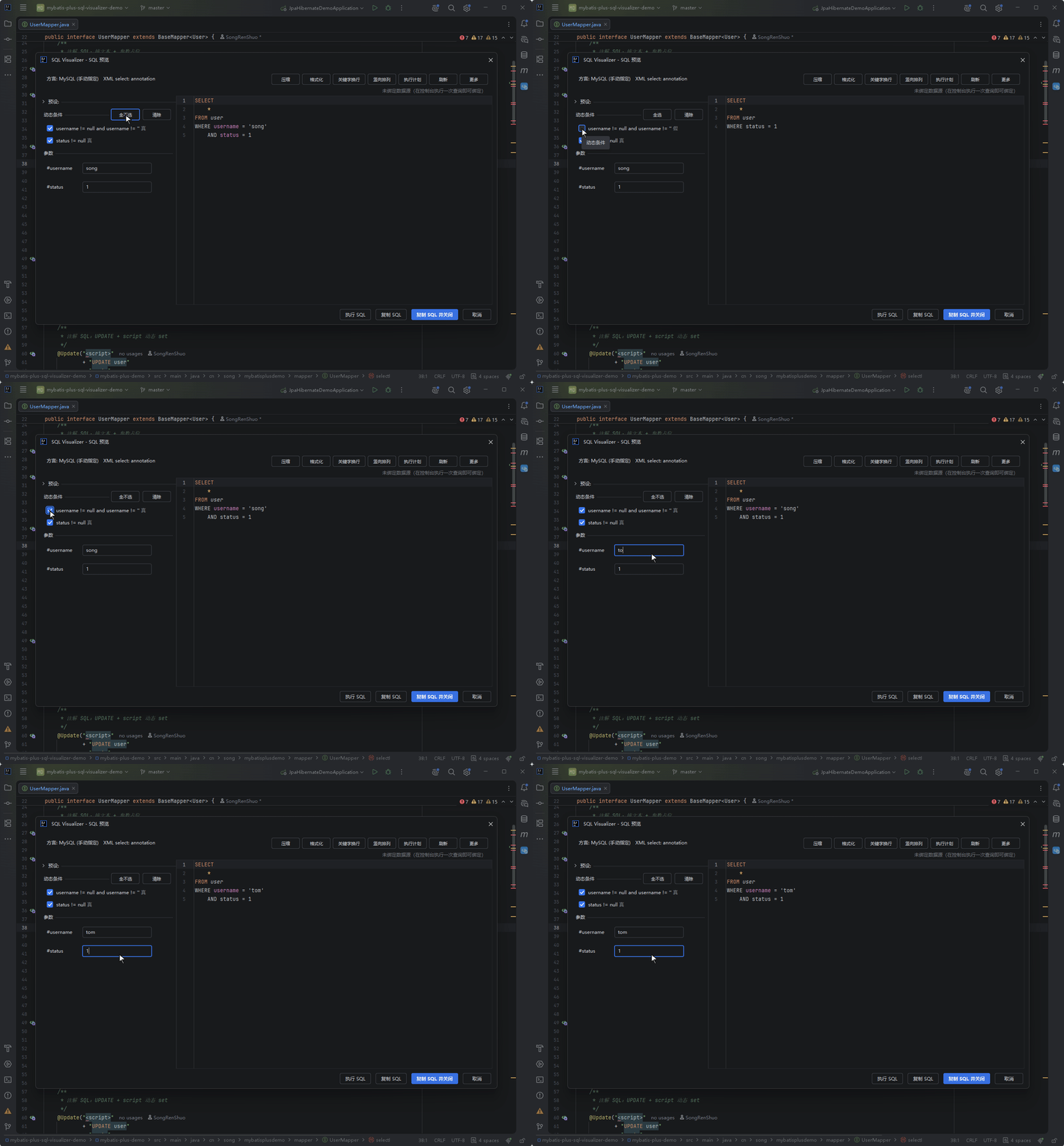
Boolean-overloaded conditions like .eq(true, ...) can be toggled in the left panel, re-rendering SQL in real time.
Parameter Fill-in
?placeholders replaced with actual values- LIKE params auto-append
%, producingLIKE '%value%' - Quote wrapping based on field type (numbers unquoted, strings quoted)
- With a data source configured, column names can be calibrated against the data source's real columns (the "Calibrate column names from the data source" setting, on by default)
Column-name calibration boundaries (When to read: entity field names differ from database column names)
When an entity field name differs from the real column name (field orderID, column order_id), the name is rewritten only when it maps to exactly one column — ambiguous matches stay untouched. With no usable data source, the behavior is identical to having the option off.
Parameter presets and parameter history
The parameter area can store named parameter sets ("Manage Presets"), and the values you type are remembered automatically ("default preset"). Both kinds of memory are scoped per declaring method:
- The key includes the method signature, so two methods never share values; a preset with the same name is stored separately under each
- Editing the SQL text does not lose the parameters — it still falls back to that method's most recent save; presets are permanently bound to the method too: a preset remembers the method it was saved under, so renaming parameters or restructuring the statement still resolves by method, with no loss from text-fingerprint drift
- Presets carried over from older versions are migrated into method scope automatically on first hit, with no manual re-saving
14-Dialect Pagination
The dialect count goes from 11 to 14: GaussDB is split out of the merged openGauss form into its own dialect — the settings dropdown, log badges and MCP dialect names now all show GaussDB instead of openGauss; two new dialects join the list, HighGo (jdbc:highgo:) and Vastbase (jdbc:vastbase: / jdbc:dws:iam:); and KingBase's PostgreSQL-protocol driver (postgresql-for-kingbase) is no longer mistaken for PostgreSQL. Also, previews under GaussDB / DM / HighGo / Vastbase used to always degrade to simplified mode (banner shown, table/column completion unavailable) because the parser registrations the platform requires were missing — fixed.
| Dialect | Syntax |
|---|---|
| MySQL / MariaDB | LIMIT [offset,] count |
| OceanBase (MySQL mode) | LIMIT [offset,] count |
| DM (Dameng) | LIMIT [offset,] count |
| PostgreSQL / openGauss | LIMIT count OFFSET offset |
| KingBase | LIMIT count OFFSET offset |
| GaussDB / HighGo / Vastbase | LIMIT count OFFSET offset |
| SQLite / H2 | LIMIT count OFFSET offset |
| Oracle | OFFSET n ROWS FETCH NEXT m ROWS ONLY (or FETCH FIRST m ROWS ONLY when there is no offset) |
| SQL Server | OFFSET {offset|0} ROWS FETCH NEXT count ROWS ONLY |
One thing to know about SQL Server: the OFFSET … FETCH NEXT clause must follow an ORDER BY. When the statement has none, the preview appends an ORDER BY (SELECT NULL) placeholder (the community-standard way to say "no particular order") — without it the rendered SQL fails on a real server with Incorrect syntax near '0'.; no placeholder is added when an ORDER BY is already present.
Upsert conflict clauses for OceanBase and openGauss also render in their real forms (openGauss uses the MySQL-style ON DUPLICATE KEY UPDATE, not PG's ON CONFLICT).
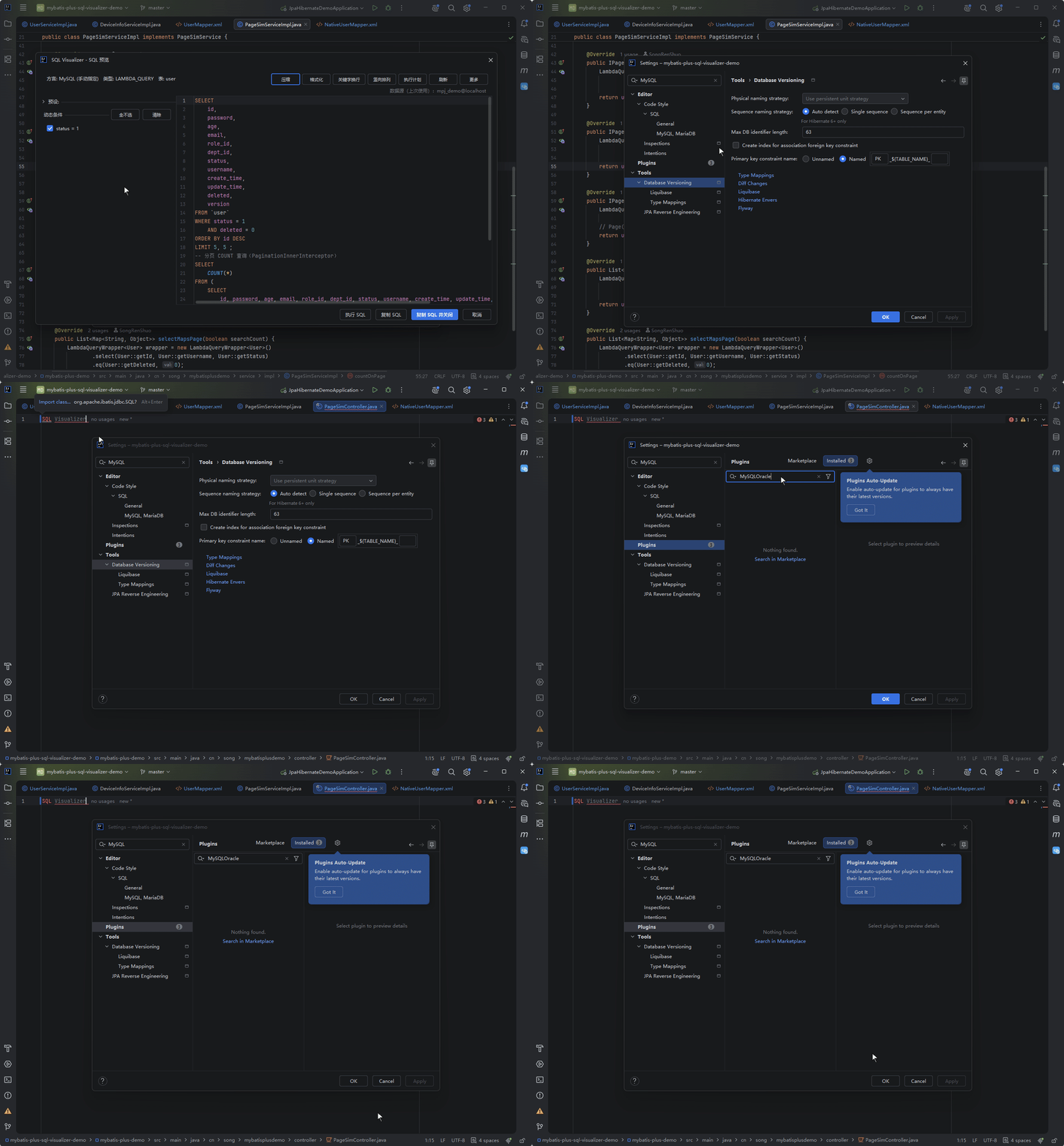
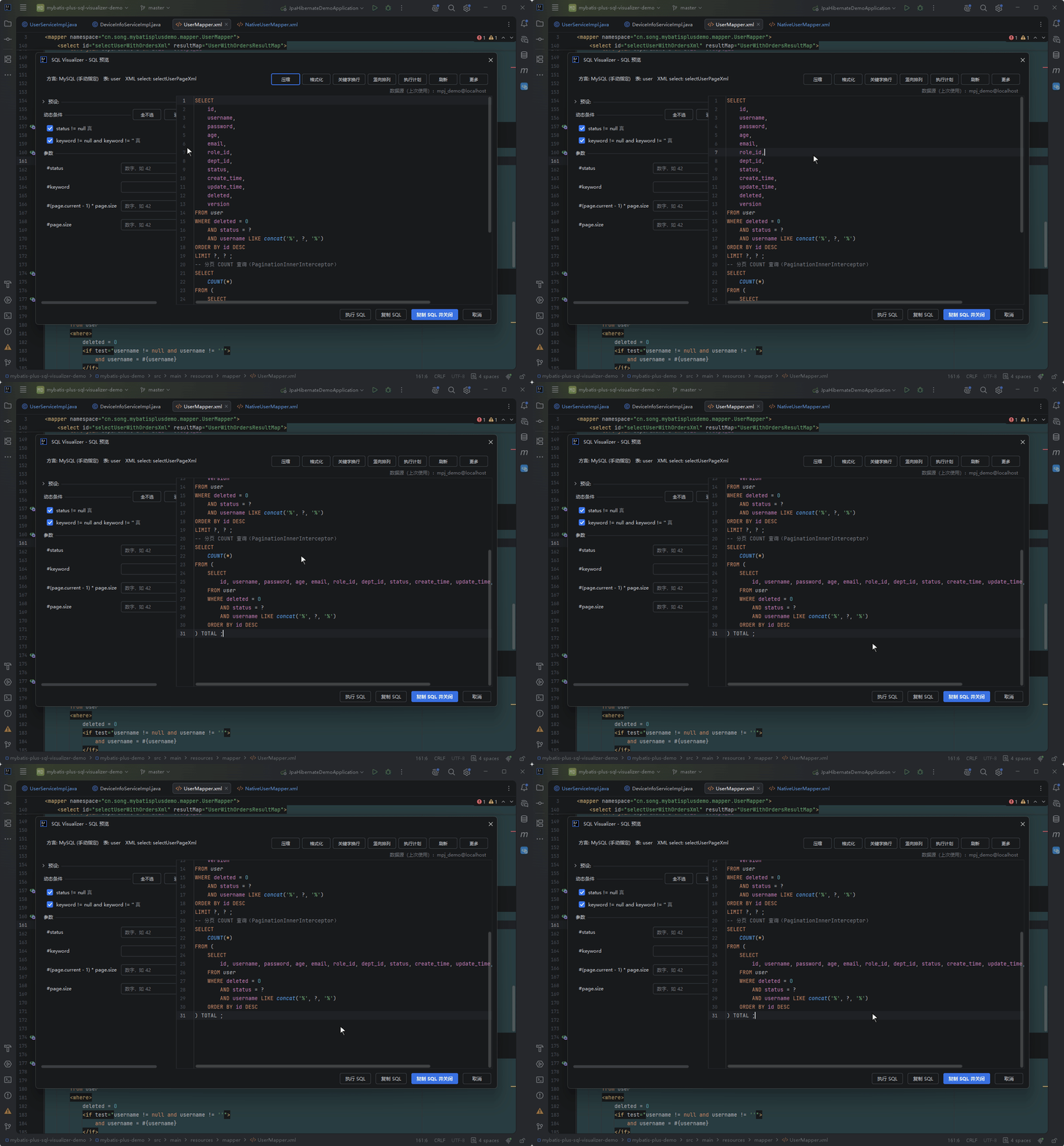
Statements taking a Page / IPage argument simulate pagination the way MyBatis-Plus' PaginationInnerInterceptor behaves at runtime: the preview appends the pagination clause to the original statement and also emits a COUNT wrapper as a second statement (SELECT COUNT(*) FROM (original SQL) TOTAL, annotated with its origin); statements with searchCount=false or a handwritten LIMIT produce only one of the two. The COUNT product sits at the bottom of the panel, so you have to scroll to see it. The settings page's "SQL Preview" tab can switch the whole simulation off, or drop just the COUNT half via "append paginated COUNT preview".
JOIN Diagram
JOIN query previews ship with a relationship diagram rendered by IDEA's native Diagrams engine (the built-in renderer can be restored in settings).
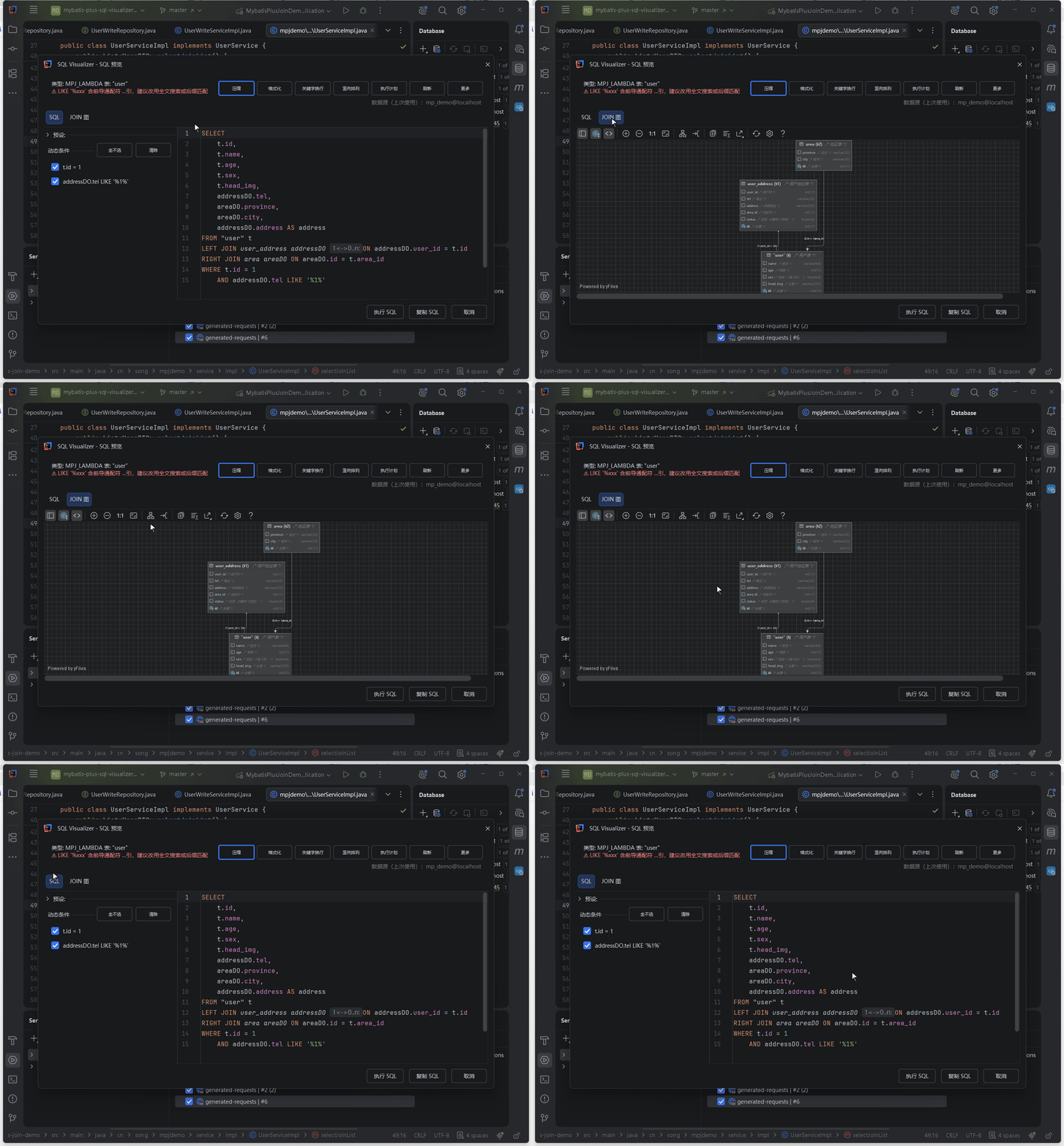
Node column scope and rendering behavior (When to read: diagram nodes show incomplete columns or rendering misbehaves)
JOIN tables are drawn with the same full entity column list as the main table — wide tables over 50 columns keep only primary-key columns, and columns referenced by the SQL are appended after the entity columns. Columns that exist in the data source but are not mapped by the entity are added to the node as well, with the database COMMENT and real type. Column comments come from two sources — entity comments and database COMMENTs — falling back to the database when the entity has none. A loading indicator is visible while rendering; if rendering fails, an error page shows a summary of the cause.
Safety Warning
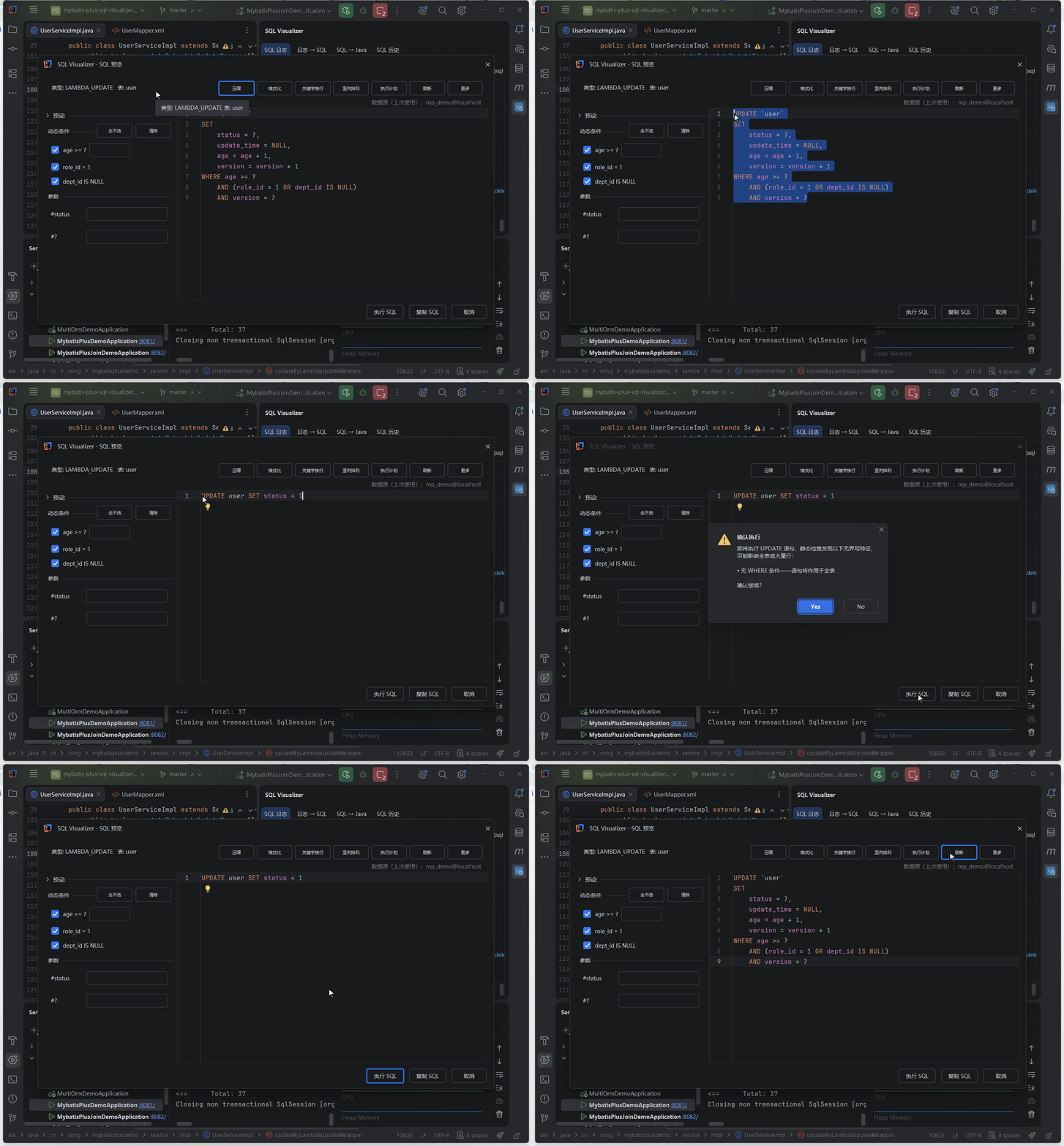
When an UPDATE / DELETE lacks an effective filter, the Execute SQL confirmation is escalated into an unbounded-write warning: the title and buttons stay the same (still Confirm Execution with Yes / No — no extra step), while the body lists each trait the static check matched:
- No WHERE clause — the statement will hit the whole table
- A tautology such as
1=1— WHERE does not filter anything - An OR branch containing a tautology — every row matches
- A pure-wildcard LIKE such as
'%'— equivalent to no filtering - A WHERE made only of constant expressions — no column reference at all
The verdict comes from static analysis of the SQL syntax tree (the same source as the snapshot weak-predicate warning in the rollback view); a parse failure is treated as the highest risk, but it is still this one single confirmation with no extra blocking. Without any of the traits above the message stays unchanged.
The same confirmation dialog also runs a pre-execution self-check and lists two further kinds of finding:
- Dialect capability gaps — the statement uses a shape the current dialect does not support:
DELETE ... LIMIT n(the row cap is silently dropped, so the delete may touch far more rows than expected), no native UPSERT form (the preview degrades to a plain INSERT, which fails when the row already exists), or aSET IDENTITY_INSERTwrapper (this dialect does not use that wrapper — likely a leftover from another dialect) - Unrecognised columns — column names that do not match the data source's real columns, each with a "did you mean xxx?" suggestion
Both kinds share the one dialog with the unbounded-write traits and add no extra step; when none of them match, the message is byte-for-byte unchanged.
Static Performance Advice
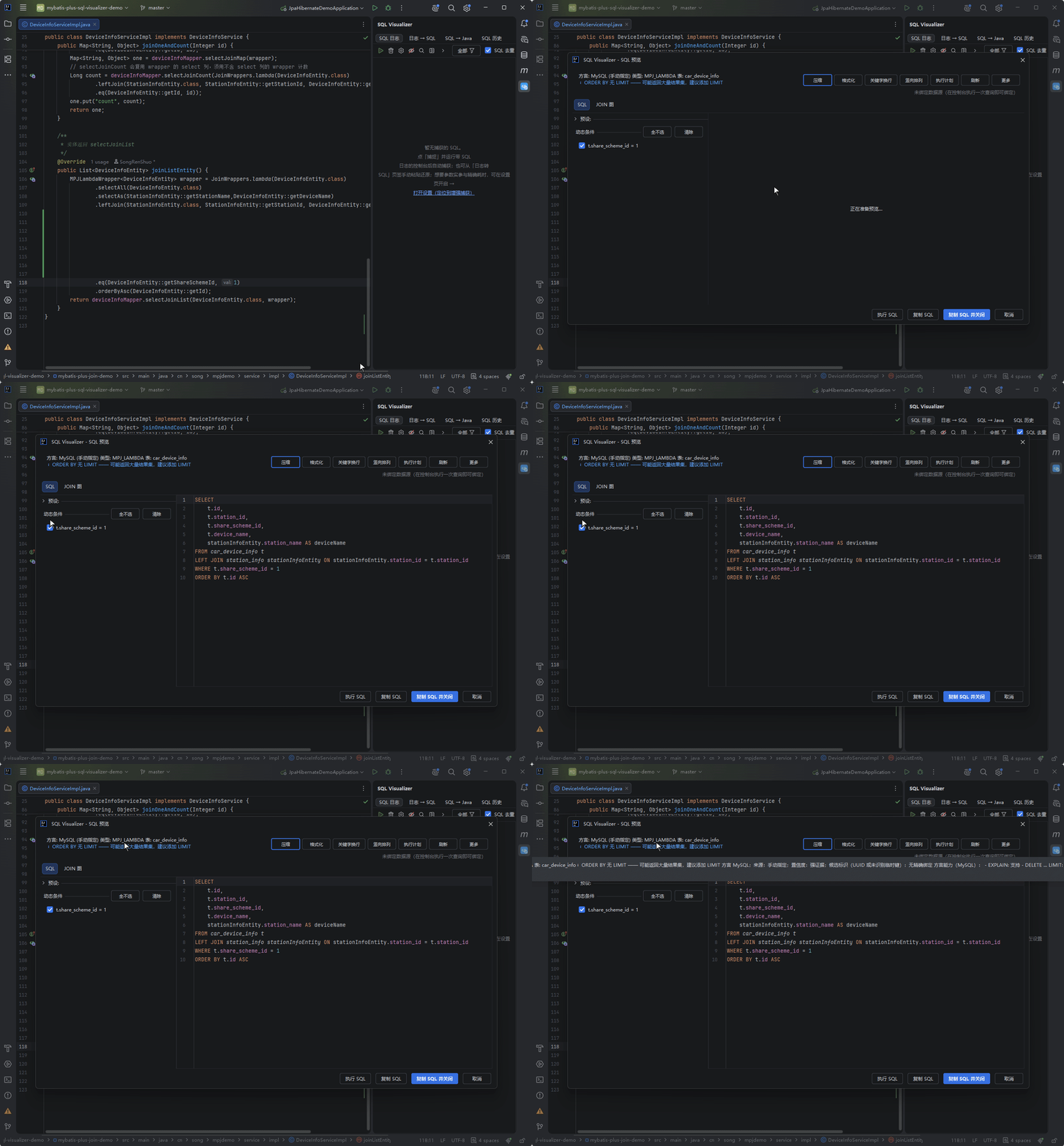
As soon as the preview renders SQL, the panel lists static performance advice line by line below the meta row (ORDER BY without LIMIT, LIKE with a leading wildcard, a missing WHERE, overly deep subqueries and so on). A red ⚠ prefix marks warnings and a blue ℹ prefix marks hints, sitting side by side with the real EXPLAIN plan. The visible text is truncated to a width budget (an ellipsis at the end); hover to read the full text of every suggestion.
Logic Delete Injection
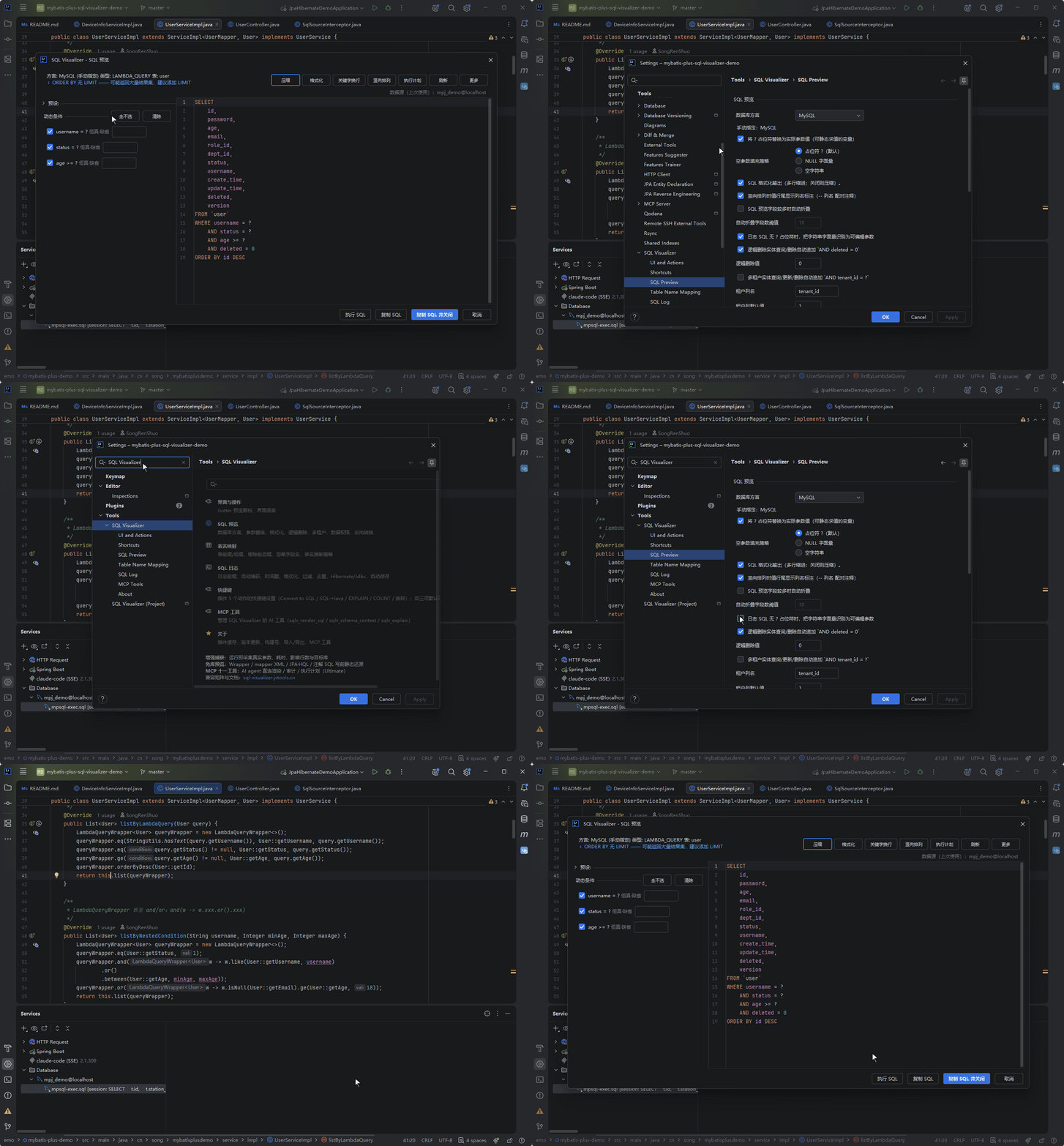
Entities with @TableLogic auto-append AND deleted = value (the value is configurable in settings, default 0).
Execute SQL
With IntelliJ IDEA Ultimate + Database plugin, a temporary .sql file is created automatically after preview, then executed with Ctrl+Enter. The preview dialog is non-modal: when a data source password expires during execution, IDEA's credential prompt is never hidden behind it, so you can type right away. Execution failures are reported inline in the panel instead of a modal dialog interrupting you.
The panel's status row is explicit about where the current data source came from: an active console binding reads "bound"; when only a memory hit applies it reads "data source (last used)" or "data source (last used in this module)" — in a multi-module project each module remembers its own source and never borrows another module's database; with neither, it says "no data source bound (run one query in the console to bind)".
The console used for execution is reused by binding identity: whichever database the preview header is bound to is the console the statement runs on — the old "preview says bound to A, execution lands on B's existing console" mismatch is gone; after you explicitly switch sources, the data-source picker restores the full data source list.
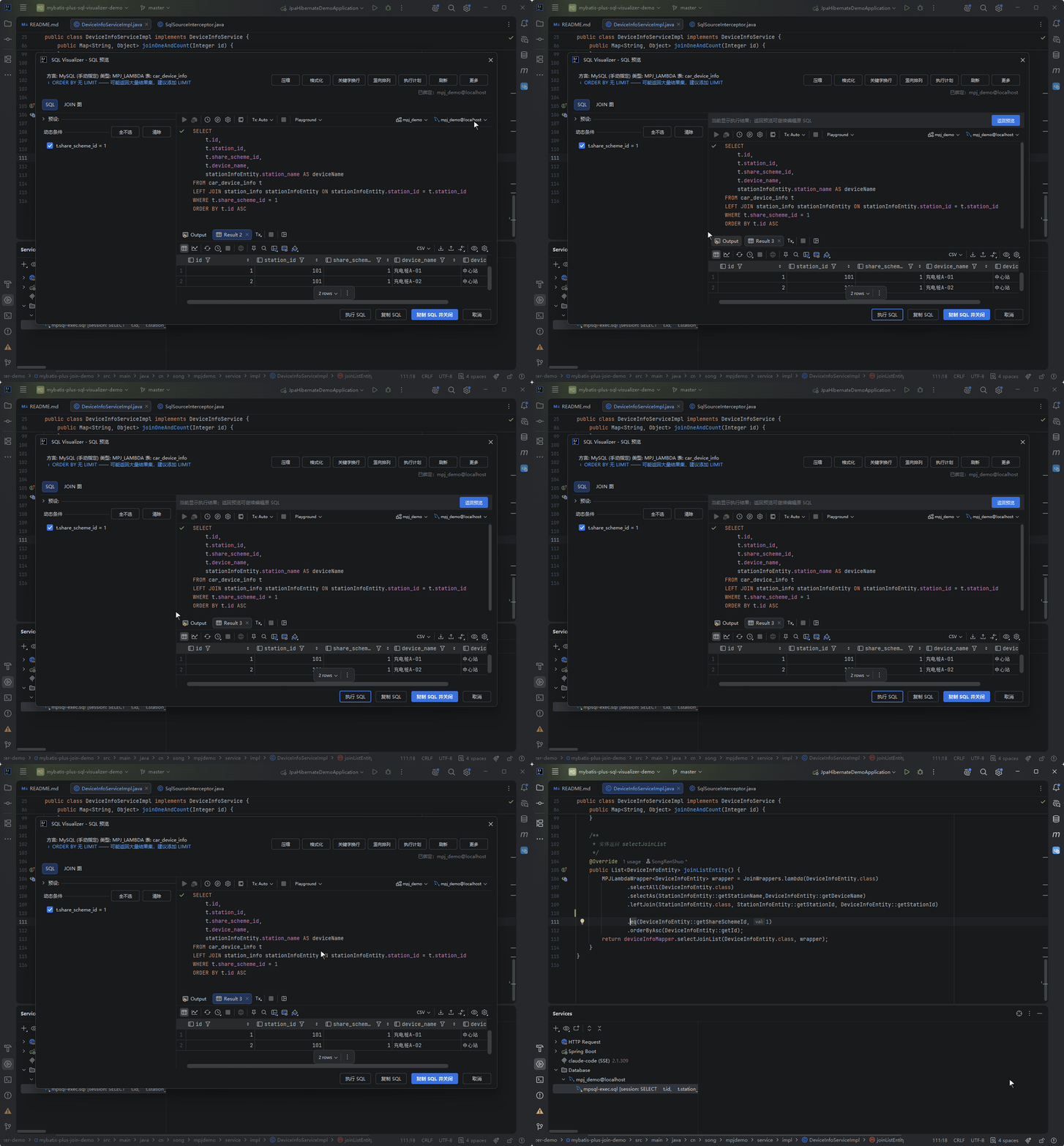
Schema annotations in the preview editor
If a column name in the preview SQL does not exist in the data source, the editor underlines it with a red squiggle and offers suggested column names on hover — you catch the typo before running instead of after a failure. Annotations apply only to the temporary file the preview generates (including mpsql-exec.sql), and they are deliberately conservative: nothing is annotated while the cache is cold, or on JOIN / CTE queries, so a wrong hint is never shown.
Want to tweak the SQL and run it again? Click "Back to Preview" in the execution view header to return to the editable SQL — no need to close and reopen the dialog.
Of the four buttons at the bottom of the panel, "Copy SQL and Close" is the blue primary action: it copies the current SQL and closes the panel in one click. That suits the most common ending — "copy this out and paste it somewhere" — one step fewer than Copy then Cancel.
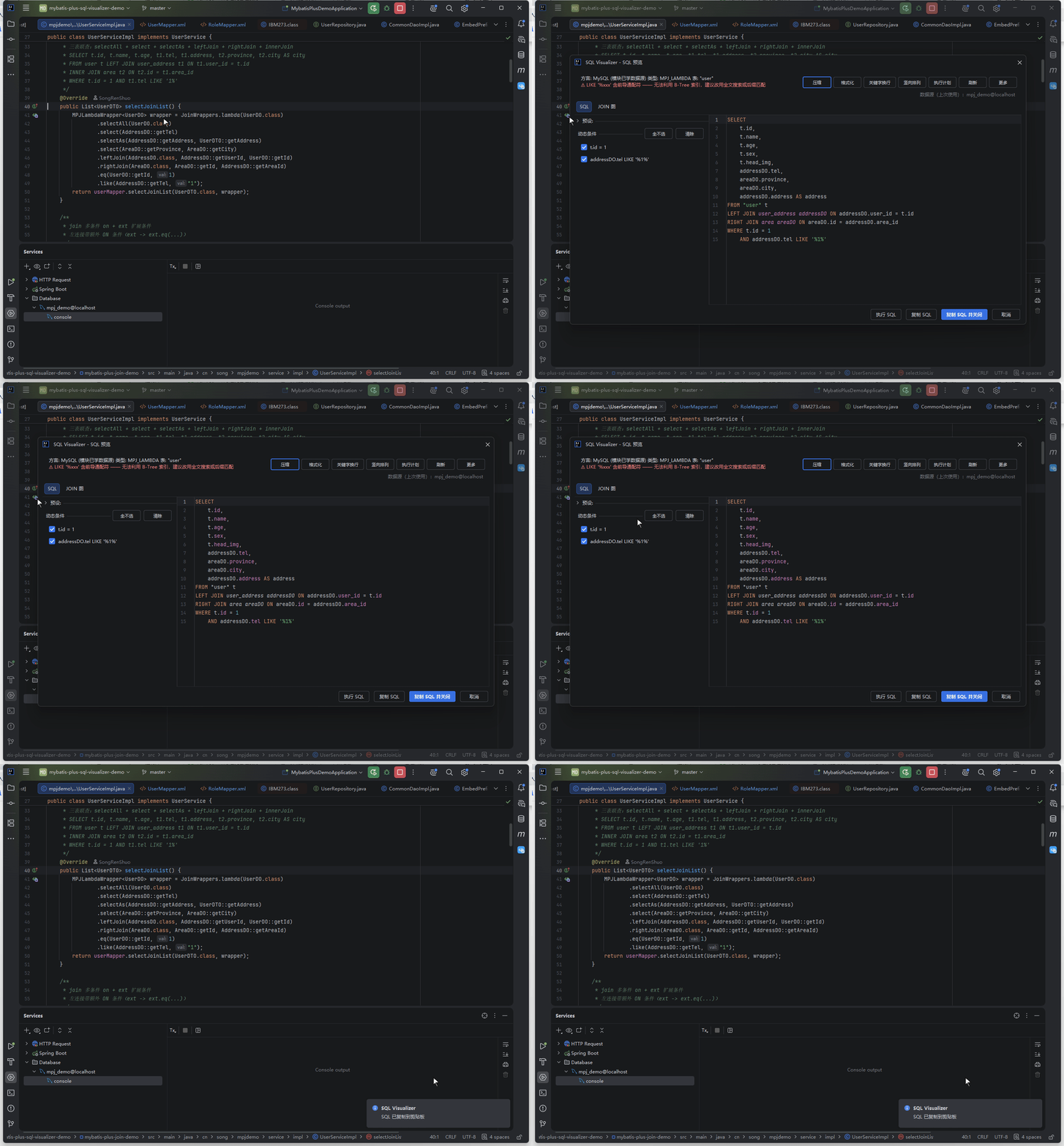
Read-only actions (affected-row estimate, EXPLAIN, rollback snapshot query) go through a read-only side channel and never replace the SQL you are looking at in the editor — open the matching result view to inspect them, or click "Back to Preview" to keep editing. The two paths do not interfere.
DML Impact Estimate
After editing an UPDATE / DELETE, you want to know how many rows it will actually touch — "Estimate Affected Rows" in the panel's More menu rewrites the current WHERE predicate into an equivalent read-only COUNT(*) probe and runs it through a read-only side channel against the bound data source: it never enters the shared console and never replaces the SQL you are looking at.
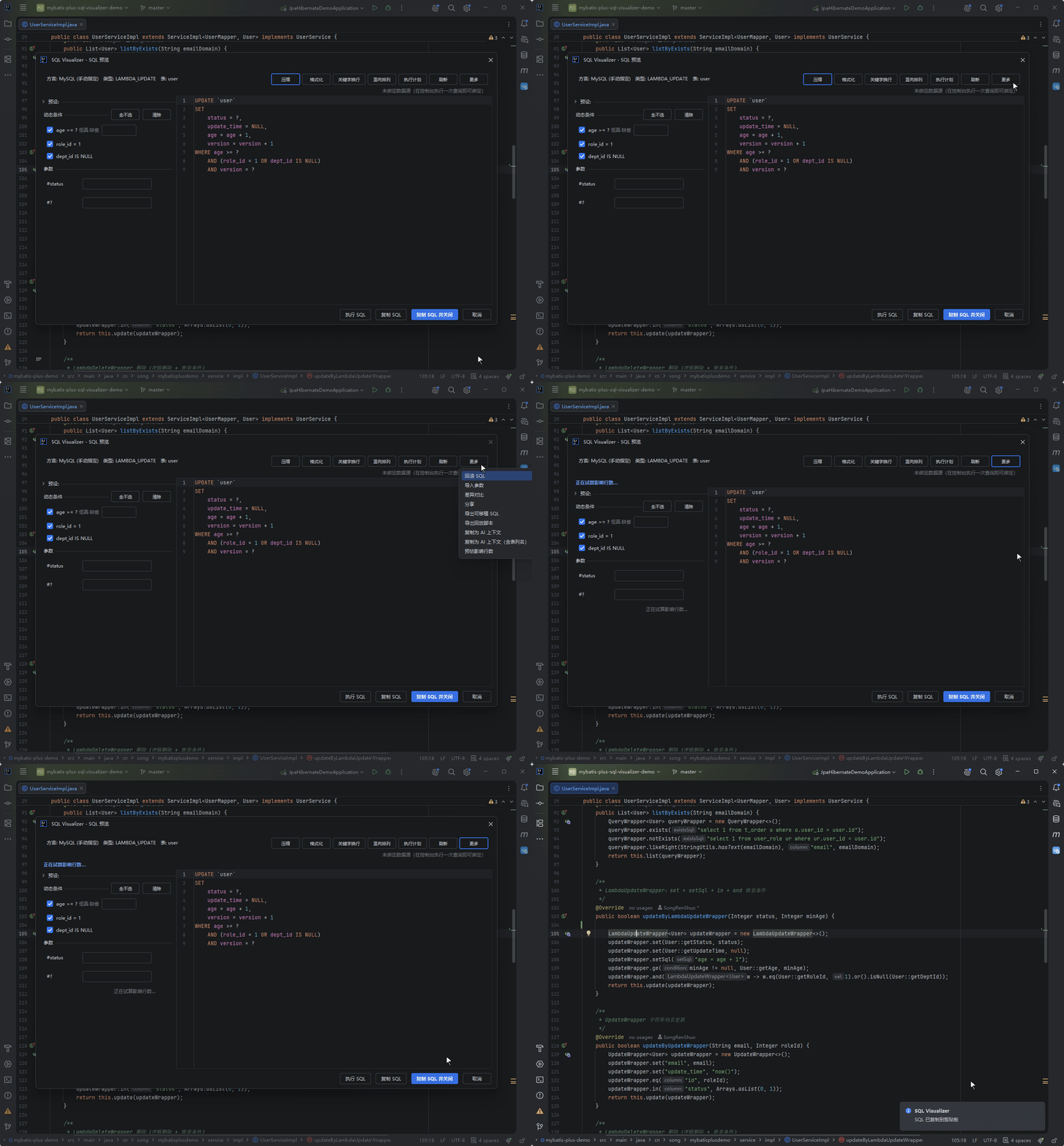
The result appears as a standalone banner at the top (blue, bold); hovering it shows the probe statement, target table and row-cap note. With DELETE ... LIMIT n on a dialect that supports it, the banner reads "≤n (DELETE LIMIT cap)" and the probe itself wraps a LIMIT subquery.
These shapes are not estimated — the plugin explains why instead of giving you a number that might be wrong:
| Shape | Reason |
|---|---|
| Unparseable statement | Without parsing there is no guarantee the rewrite is equivalent |
| Multiple statements | Only a single UPDATE / DELETE is supported |
| Not UPDATE / DELETE | Other statements have no "affected rows" meaning |
| JOIN / multi-table write | COUNT would count rows matched multiple times by the join, so the number would be inflated |
| No WHERE | A full-table COUNT is a full scan — exactly the shape the unbounded-write warning on execute blocks |
| WHERE too complex (very long subquery predicate) | The probe statement would be extremely long and its cost uncontrollable |
With no data source bound, a data-source picker opens and retries automatically once you pick one. The probe also obeys the dialect gate: COUNT is generated for the current dialect, and a mismatch with the target data source fails closed rather than sending another dialect family's COUNT to that database.
Dialect Mismatch With the Data Source
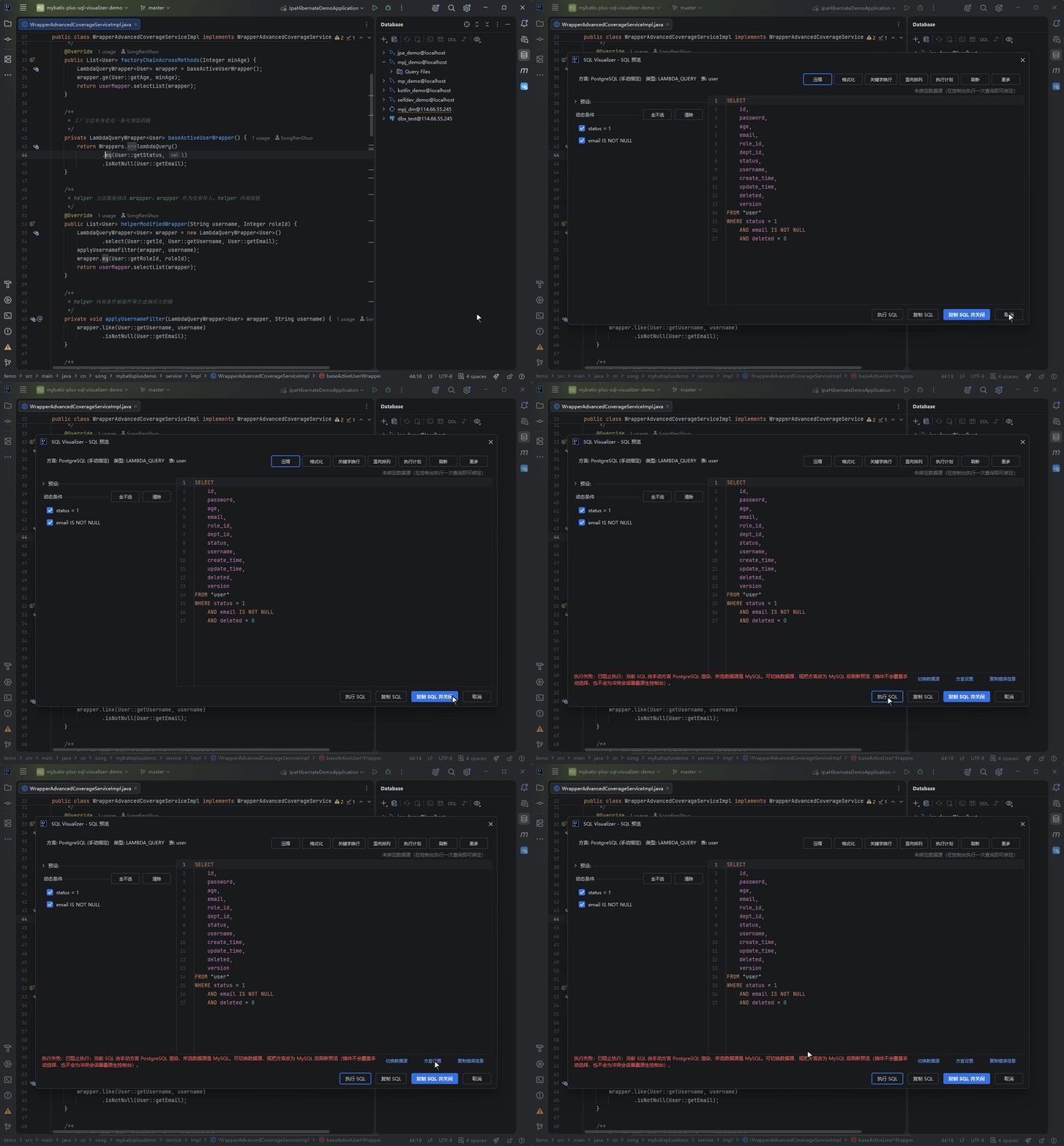
When the dialect used for preview and the dialect of the data source you want to execute against do not match (for example an Oracle-rendered SQL submitted to MySQL), the plugin warns but does not block: the result row explains the mismatch, and the SQL is still submitted to the data source you picked, leaving the verdict to the database itself.
This is deliberate — the dialect belongs to rendering and inference, and should not hold a veto over execution. Once you have explicitly chosen a data source, the plugin sends the SQL as-is; whether it is valid is answered most accurately by the target database (PostgreSQL replies ERROR: relation "user" does not exist, MySQL replies with a syntax error).
The judgement is transparent too: the SQL's dialect source, confidence and candidate data-source identifiers can all be inspected on demand in the panel.
The one case still blocked is a write or EXPLAIN where either side's dialect is unknown (rendered source undetermined, or the target data source's dialect cannot be resolved). That is not "a conflict was detected" but "no judgement is possible", and blindly firing PostgreSQL syntax at a MySQL database is not a risk worth taking — so it stays fail-closed.
The result row also offers:
- Switch Data Source: pick a data source that matches; once bound, the preview re-renders for the new dialect and retries
- Dialect Settings: jump straight to the plugin's dialect configuration page
- Copy error message: copy the whole explanation for pasting into an issue or a chat
Real EXPLAIN Plan
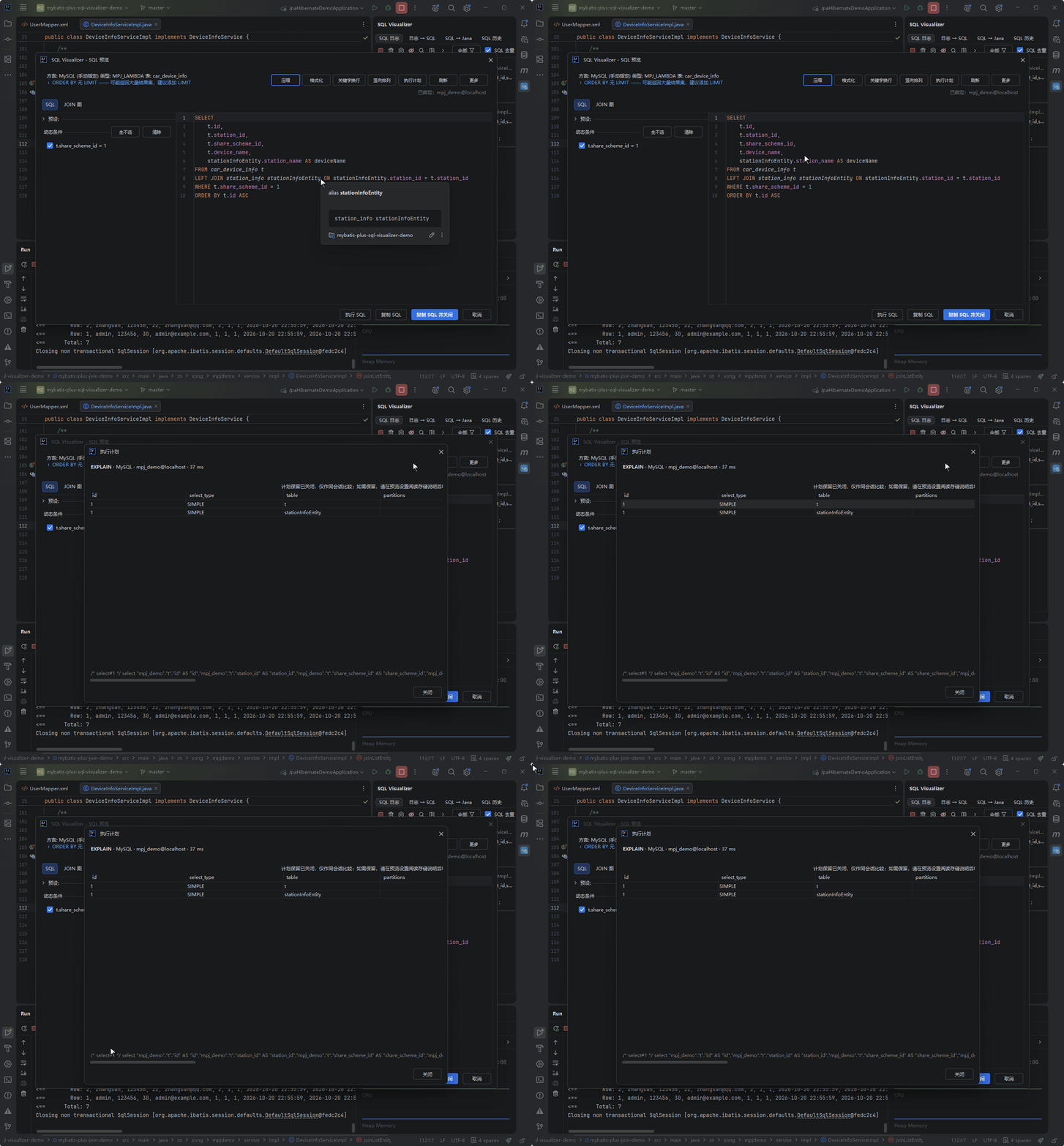
The "EXPLAIN" button in the preview panel's button row: pick a data source, click, and the plugin wraps the SQL into an EXPLAIN statement for the current dialect and submits it to the native database console — the real execution plan sits side by side with the panel's static performance-rule annotations. EXPLAIN counts as confirmation-free, so there is no DML confirm dialog.
| Dialect | Rendered Form | Verification |
|---|---|---|
| MySQL / MariaDB | EXPLAIN <sql> (native table rows) | verified on real DB |
| PostgreSQL | EXPLAIN (FORMAT JSON, VERBOSE) <sql> | verified on real DB |
| KingBase | EXPLAIN (FORMAT JSON) <sql> | verified on real DB |
| DM (Dameng) | EXPLAIN FOR <sql> (native 19-column plan table) | verified on real DB (DM8 8.1.3.12, raw JDBC, 2026-10-31) |
| H2 | EXPLAIN PLAN FOR <sql> | engine-level unit tests |
| SQLite | EXPLAIN QUERY PLAN <sql> | engine-level unit tests |
| OceanBase (MySQL mode) | EXPLAIN <sql> (text plan tree, not table rows) | community-image engine probe (OB CE 4.3.5) |
| openGauss | EXPLAIN (FORMAT JSON) <sql> | verified on real DB |
| GaussDB | EXPLAIN (FORMAT JSON) <sql> | official docs (live DB pending) |
| HighGo | EXPLAIN (FORMAT JSON) <sql> | community-image engine probe (V6.0.1) |
| Vastbase | EXPLAIN (FORMAT JSON) <sql> | community-image engine probe (A-mode) |
| Oracle | EXPLAIN PLAN FOR <sql> (plan goes to the session-level PLAN_TABLE) | verified on real DB (Free 23 / XE 11g) |
| SQL Server | SET STATISTICS XML ON; <sql>; SET STATISTICS XML OFF | verified on real DB (official SQL Server 2022 image) |
Oracle's plan rows land in the session-level PLAN_TABLE while the statement itself returns 0 rows, so the panel points you to run SELECT * FROM TABLE(DBMS_XPLAN.DISPLAY) on the database side over the same connection. SQL Server returns the plan XML as an additional result set after the statement, visible in the native console's extra result tabs.
One thing to know about Dameng: EXPLAIN FOR is the form that returns a plan — a bare EXPLAIN returns no result set at all on DM8 (zero columns, and no second result set either), which looks exactly like "the plan body is empty". Hence this table uses EXPLAIN FOR. What comes back is a 19-column structured plan table (PLAN_ID / LEVEL_ID / OPERATION / TAB_NAME / IDX_NAME / SCAN_TYPE / ROW_NUMS / BYTES / COST / CPU_COST / IO_COST / FILTER / JOIN_COND / ADVICE_INFO and more), so DM behaves like the MySQL table family: it can feed the structured plan view, be compared across runs, and be kept in history.
Like "Execute SQL", EXPLAIN requires a configured data source (Ultimate's Database tool window); without one you'll be asked to configure it first.
Hovering the preview panel's meta row also reveals the dialect capability matrix — for the dialect this SQL was actually rendered with, it lists whether EXPLAIN / DELETE ... LIMIT / UPSERT / IDENTITY wrapper are supported, with the reason when they are not. It is the explanation surface behind the pre-execution self-check and each action's availability: to see why an action is unavailable for a statement, look here first.
Cross-Run Comparison and Plan History (experimental)
Everything in this section requires the experimental switch below; with the default form, Explain goes through the embedded native console and there is no baseline dropdown or history comparison.
After you add an index or change a condition, did the plan actually change? As soon as this session holds a previous plan for the same SQL, the view shows a "Choose a history baseline to compare (does not re-execute the SQL)" row with a baseline dropdown, defaulting to "Previous execution (current session)"; it aligns the two results into a tree diff and marks cost / rows changes. Nodes are identified stably by "structural path + occurrence index among same-type siblings", so adding or removing a sibling never shifts later nodes. MySQL / MariaDB / Dameng table families and PG / KingBase / openGauss JSON families are comparable; Oracle / SQL Server text plans degrade honestly to "not comparable" rather than forcing a diff.
This only exists in the structured Explain view, which requires enabling "Render EXPLAIN structurally inside the preview panel" under SQL Preview in Settings (experimental, off by default). With it off, Explain goes straight to the native database console and there is no baseline dropdown.
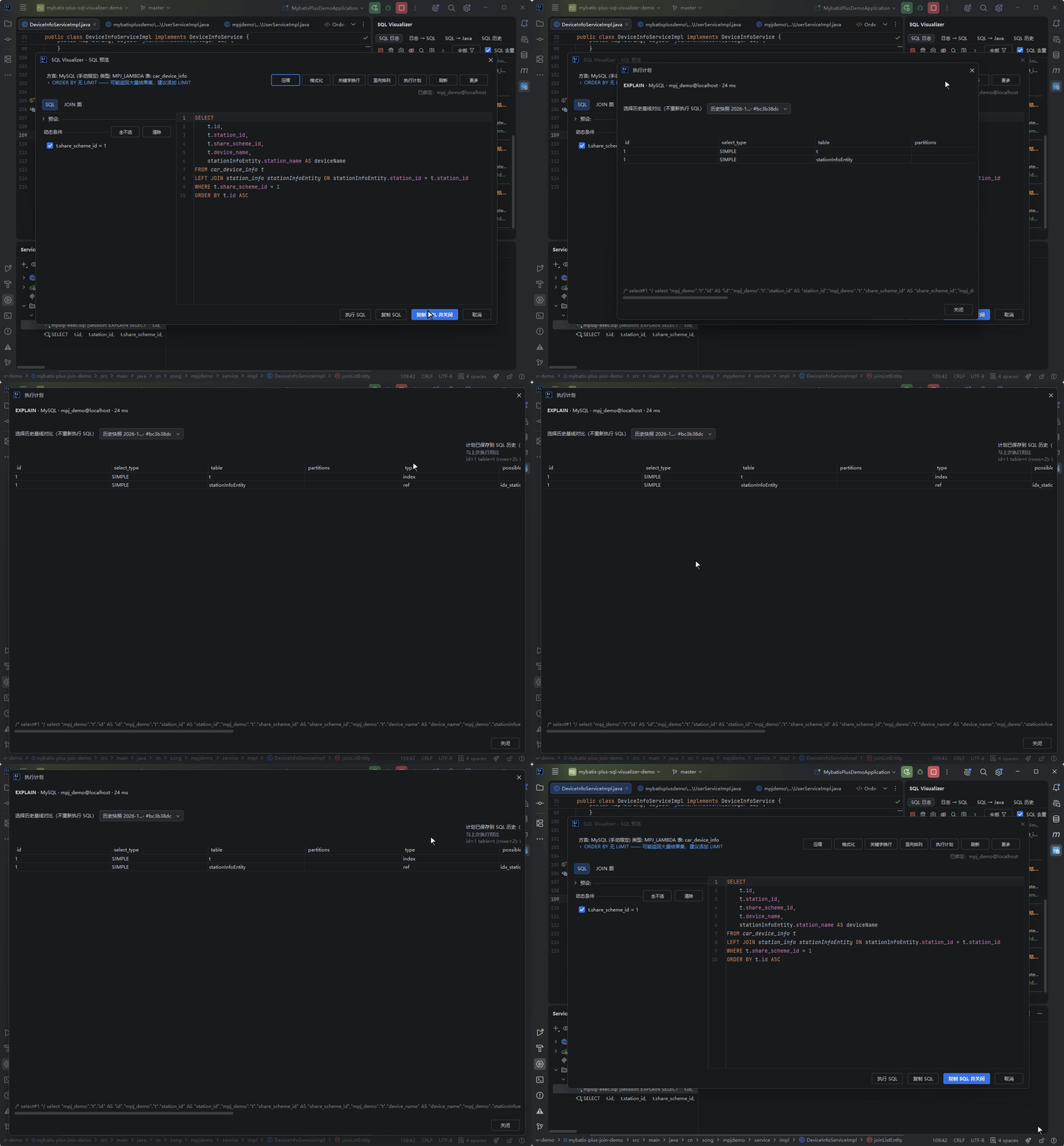
By default comparison only happens within the current session. To keep plans across IDE restarts, turn on "Keep raw EXPLAIN plans across sessions" in the settings SQL Preview group — it is off by default because raw plans are not redacted and predicates may contain business values, credentials or keys. Once enabled:
- Plans are isolated by "project + stable data-source UUID + dialect + format + SQL fingerprint", so they never bleed into another database or another statement
- Table families (MySQL / MariaDB / Dameng) and JSON families (PG / KingBase / openGauss / HighGo / Vastbase / GaussDB) are stored as structured snapshots; text families (Oracle / SQLite / H2 and others) are stored as the raw plan text — which means those text plans, previously never persisted, now also land in local history once this switch is on, equally unredacted
- Each history entry keeps at most 5 snapshots, 256 KiB each after serialization (over-limit saves are skipped; the currently displayed result is unaffected)
- Picking a history baseline is read-only and never re-executes the SQL
- Clearing preview SQL history also deletes retained plans; turning the switch off only stops new saves and deletes nothing
Save failures are reported honestly rather than pretending success: missing a stable data-source UUID or a same-project history entry degrades to "this session only"; oversized plans say they were not saved; a cleared history or deleted entry says the late result was not written.
Recent Executions
Reading a Wrapper chain and wondering what its latest actual execution looked like — right-click the anchor icon and choose "Recent Executions". The plugin searches the log entries captured this session for executions near that spot (same file first, lines within ±30 ranked higher) and opens a browsing dialog:
- The left list reuses the SQL log panel's entry renderer directly (two-line rows, type color bar, duration and source badges identical to the log page) and supports Ctrl / Shift multi-select, with "N selected" in the status line
- The right editor shows the executable SQL with parameters restored and is editable — tweak a field value temporarily and copy; both the copy button and Ctrl+C take the edited text. It is always formatted (long SQL no longer squeezed onto one line), and the two icon buttons above it are Format (idempotent re-layout) and Copy
- With multiple rows selected the right pane joins them in row order (what you see is what you copy), and Ctrl+C copies all of them at once
- Open Preview uses the last interacted row; double-clicking a row opens the full preview too, and the dialog stays open afterwards so you can compare several executions in a row
- The right-click menu carries the same six items as the SQL log page: copy timestamp (gated by the "Show timestamp" switch, grayed out when off), suppress this SQL, send to SQL → Java, send to Log → SQL, jump to Java, jump to Mapper XML (hidden when it cannot resolve). It deliberately has no delete — the dialog is a browsing view and never mutates the global log buffer
- The dialog is non-modal, draggable and remembers its size and position; an empty match still opens the dialog, with the empty state reported in the status line instead of a fleeting notification
Prerequisite: log capture is on and has captured executions at that spot. See SQL Log Tool Window.
Low-Frequency Actions in the More Menu
The preview panel's button row only carries high-frequency actions; the rest live under "More". All of them act on the SQL currently in the panel and never modify the editor text:
| Action | What it does |
|---|---|
| Rollback SQL | Derive the inverse SQL for the current statement; the dialog first says how trustworthy the derivation is (see XML Preview · Rollback SQL) |
| Import Parameters | Import values from the clipboard as JSON / CSV / key=value and fill them in by column name |
| Diff | Line-by-line comparison against the previous preview |
| Share | Copy as Markdown / Markdown table / executable SQL, or export an HTML report |
| Export Portable SQL | Emit the current CRUD statement plus its rollback statement, each annotated with dialect / kind / upsert form |
| Export Replay Script | See below |
| Copy as AI Context | See below |
| Estimate Affected Rows | See "DML Impact Estimate" above |
Export Replay Script
Export the panel's SQL as a single directly executable .sql file — parameters already filled in by the preview chain, statements split per dialect with a trailing semicolon added, and BEGIN ... END blocks or semicolons inside quotes never mis-split.
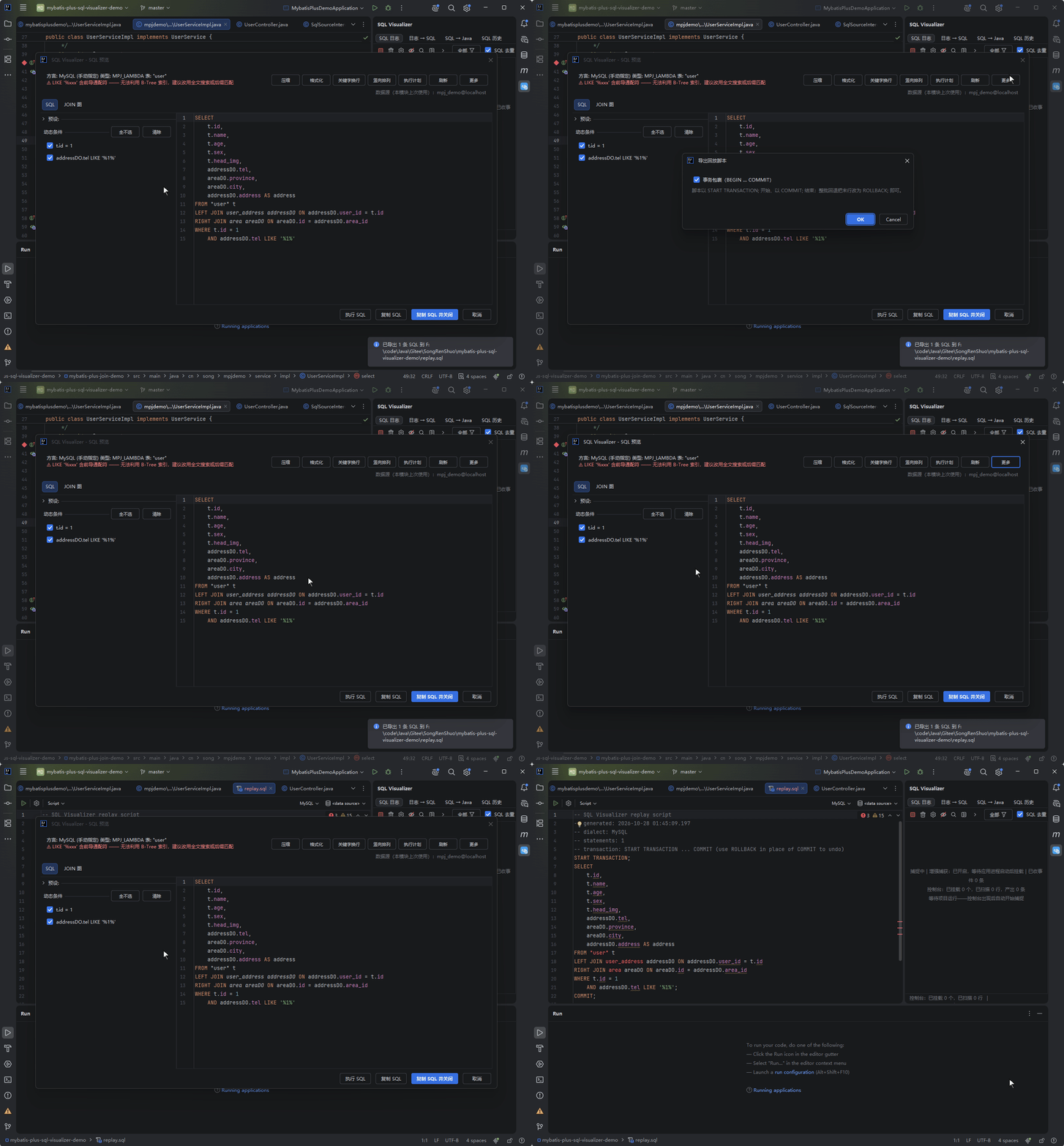
Optionally tick "Transaction wrap (BEGIN … COMMIT)": the script then opens with the dialect's explicit transaction-start statement (MySQL START TRANSACTION, PG BEGIN, SQL Server BEGIN TRANSACTION) and ends with COMMIT;; to roll the whole batch back, change the last line to ROLLBACK;. Oracle / DM have no reliable explicit transaction-start statement, so that option is unavailable there with the reason stated, and the script exports unchanged.
With "display and export masking" enabled, statements are masked before export and the header is marked masked — the script is then no longer byte-for-byte executable, which is expected (you chose that delivery form).
Copy as AI Context
Put the current SQL on the clipboard as a context block for AI. The block is a versioned diagnostic projection: source and dialect included, sensitive literals recognised and parameterized by the existing rules (with a mask count), plus — when this session already acquired an execution plan for this SQL — an acquired plan summary matched to the current SQL and actual target, and the real static table/column counts. Anything unavailable or stale is explicitly marked as missing rather than invented.
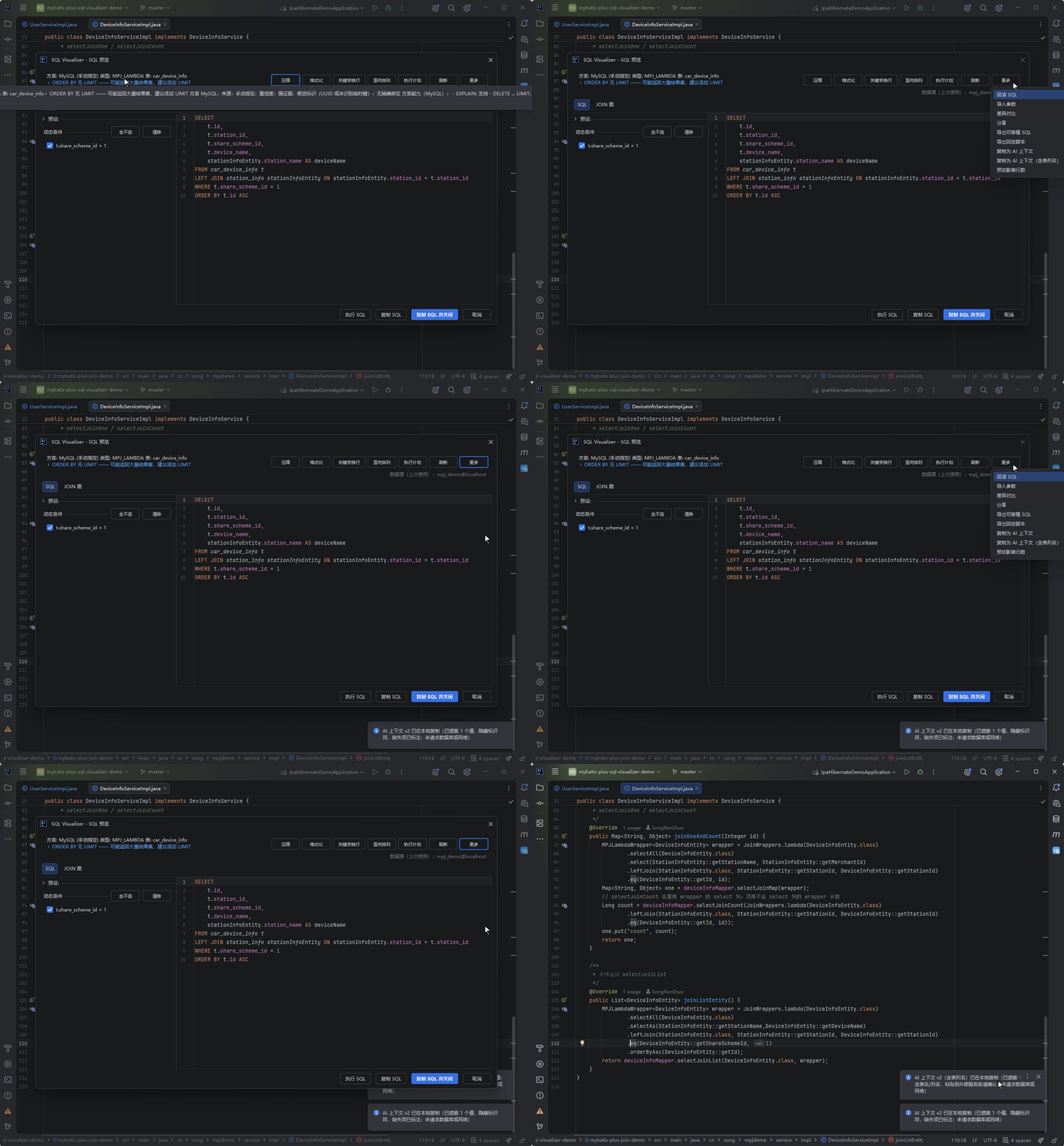
Two exits: the default one anonymises table and column names too; "Copy as AI Context (with identifiers)" keeps structure and identifiers so the AI can follow the semantics, while literals are still masked and quoted content is not copied. Structural words (SELECT / FROM / WHERE / JOIN and so on) are always kept verbatim in either mode, while aggregate functions and keywords (COUNT / SUM / JSON / FIRST / NEXT and so on) stay anonymised.
Copying never touches the database, the network or MCP — the plan summary only reuses what this session already acquired, and never runs an extra EXPLAIN just to fill the block. The summary keeps only whitelisted plan nodes and numbers, without the original plan's conditions or NOTICEs.
The boundary matters: ordinary strings that do not match a rule keep their original text (e.g. name = 'tom' is not treated as sensitive), so the block makes no promise of being entirely secret-free — read it over before pasting into an external AI. It only writes the clipboard and never uploads anything.
Export Diagnostic Report
"Copy diagnostic report (Markdown)" and "Export diagnostic report (HTML)" in the share dialog pull the information needed for troubleshooting into a single five-section report:
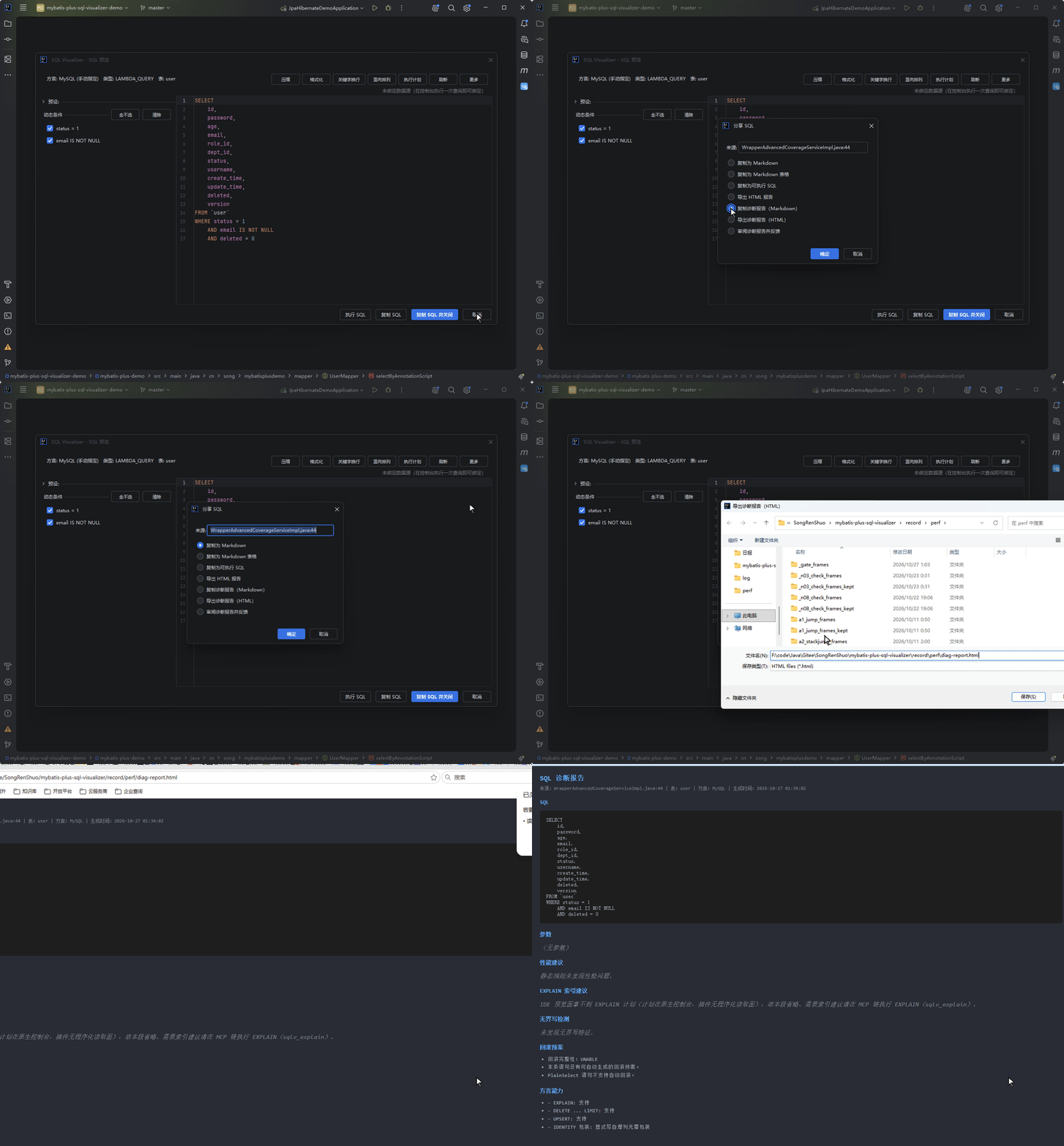
- SQL and parameters
- Static performance-rule findings
- EXPLAIN suggestions
- Unbounded-write findings
- Rollback plan and dialect capabilities
The HTML version is self-contained (inline styles), so you can send it to a colleague or paste it into an issue. When the IDE side cannot obtain real plan data, that section says so honestly instead of inventing content.
The share dialog has a third entry, "Review diagnostic report and give feedback": it turns the same diagnostic information into a feedback draft and opens the request-pool submission dialog. The draft hides SQL values, comments, parameter names and identifiers by default and attaches no parameters, paths, raw plans or files; when the quoting form is unsupported the SQL section is omitted outright, never falling back to the raw text. You can delete sections and edit the body, and it is submitted only after the destination (the public request pool) and the 16 KiB budget are stated and you agree each time — editing or retrying after a failure requires agreeing again.
Example
LambdaQueryWrapper<DeviceInfoEntity> wrapper = new LambdaQueryWrapper<DeviceInfoEntity>()
    .eq(DeviceInfoEntity::getId, 1001L)
    .isNotNull(DeviceInfoEntity::getStationId);
Generated SQL:
SELECT id, station_id, share_scheme_id
FROM device_info_entity
WHERE id = 1001
    AND station_id IS NOT NULL
Have a suggestion or hit an issue with this feature? Go to the feedback pool