


CRUD SQL Generation
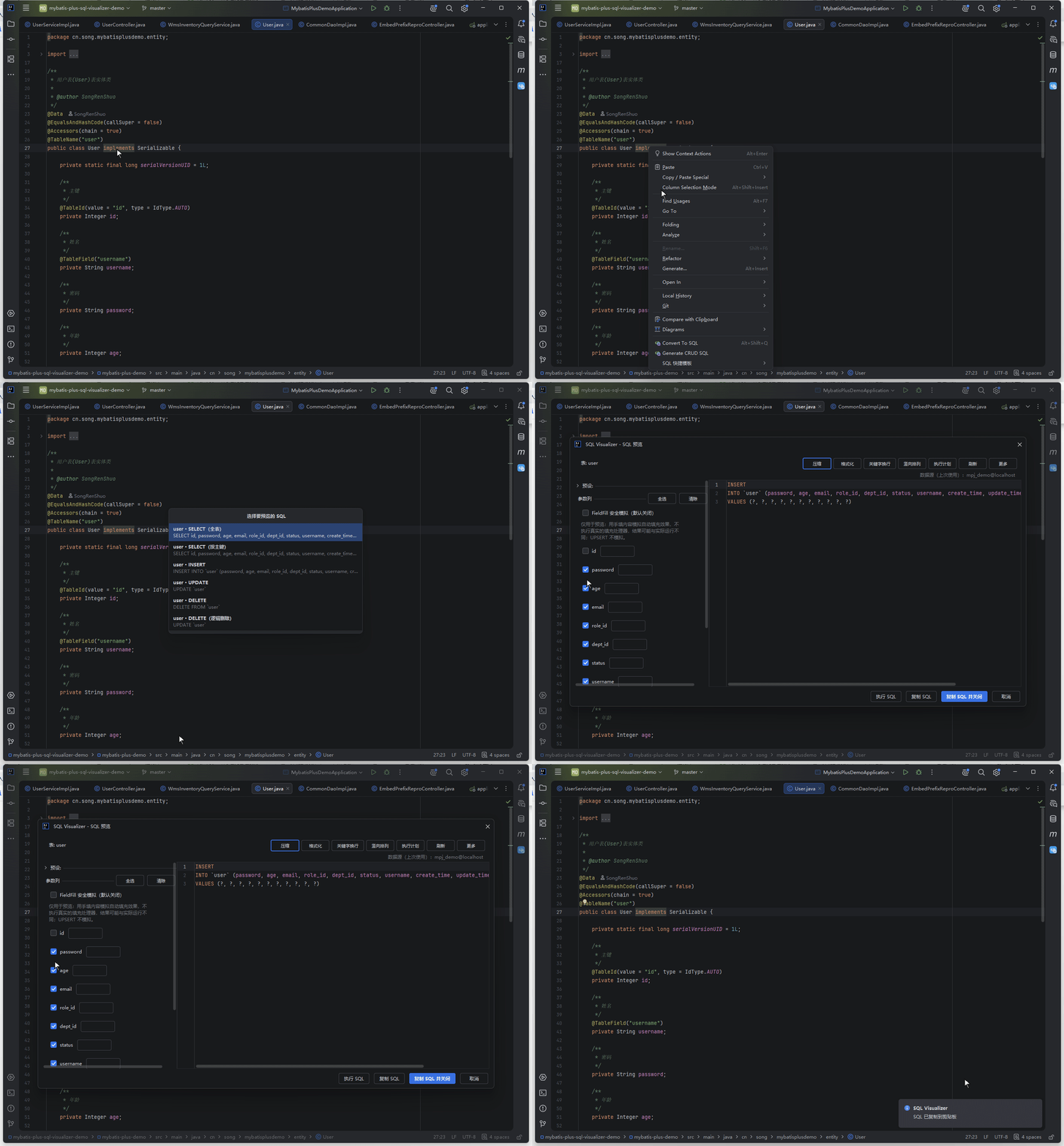
Right-click an entity class or a database table to generate SELECT / INSERT / UPDATE / DELETE statements and jump straight into the preview — no more hand-writing boilerplate SQL for mappers, data inspection, or test fixtures.
Trigger Method
Three entry points — right-click and choose "Generate CRUD SQL":
- Entity class file: right-click inside the editor (MyBatis-Plus annotated entities are detected automatically)
- Project-view entity node: right-click the entity file in the Project tool window
- Database table node: right-click a table node in the Database tool window (requires IntelliJ IDEA Ultimate; on Community only the entity-side entries are available)
Candidate Popup
A native popup lists the candidate statements first; picking one opens the preview:
- Candidates appear in order: SELECT (full table), SELECT (by primary key), INSERT, UPDATE, DELETE; when the entity has an
@TableLogiclogic-delete column, the entity-side entry additionally offers a "DELETE (logic delete)" variant (generatesUPDATE t SET logic_col = 1 WHERE pk = ?; the delete marker value defaults to 1 per MPlogic-delete-value, and custom@TableLogic(delval = ...)values can be edited right in the preview) - Type to filter candidates by summary, Enter or double-click to select, ESC to close; each row renders on two lines — a bold summary plus a secondary monospace SQL line
- The table-node entry reads real columns from the table schema; the entity side resolves table name and column list from entity annotations
Preview and Column Toggles
The selected statement opens in the existing SQL preview window, ready to edit, format, and copy:
- INSERT / UPDATE reuse the batch panel's per-column toggles: auto-increment primary keys are unchecked by default, matching MP runtime behavior
- The
@Versionoptimistic-lock column is appended to UPDATE's WHERE automatically, withversion = version + 1at the end of SET - When the entity carries
@TableField(fill = …), the parameter panel offers "FieldFill safe simulation": those fill columns get a simulated-value input for INSERT / UPDATE; a value you type goes into the SQL (the normal input grays out), leaving it blank omits the column — yourMetaObjectHandleris never executed - UPDATE / DELETE locate rows by primary key; tables without a primary key degrade the WHERE clause to a
1 = 0placeholder, flagged as "no primary key recognized" in the candidate list to prevent accidental full-table statements - Logic-delete semantics travel with the "DELETE (logic delete)" variant, leaving the physical DELETE untouched
- On SQL Server and DM (Dameng), generated INSERTs touching identity columns are wrapped in
SET IDENTITY_INSERT ... ON/OFFautomatically, so the statement replays directly; other dialects need no wrapping and the output is byte-for-byte unchanged (rollback snapshots carry the dialect and identity-column info too) - Parameter input rows follow a per-type contract: placeholder hints by category, a faint end-of-line warning when a number field gets non-numeric or a date field gets an unparseable input (a hint only, never a blocker), and mock values dispatched by category
Have a suggestion or hit an issue with CRUD SQL generation? Go to the feedback pool