


Why SQL Visualizer
In one line: see the final SQL while you write code; once your app runs, real parameters, timings and source locations drop into the list by themselves; and SQL can be converted back into Java code.
For the same problem — seeing what SQL MyBatis actually produces — there are several common approaches. This page states the capability differences only, to help you choose.
Comparison
Static preview: SQL without starting the app
| Capability | SQL Visualizer | MyBatis Log Plugin family | Manual log reading |
|---|---|---|---|
| Preview SQL without running the project (static analysis) | Yes | No | No |
| Wrapper chains (Lambda / string) to SQL | Yes | N/A | Manual |
| MPJ join (JOIN) queries to SQL | Yes | N/A | Manual |
| XML dynamic tags (if/choose/foreach…) rendered with MyBatis semantics | Yes | Partial | Manual |
Annotation SQL / <script> / Provider preview | Yes | N/A | Manual |
| JPA / Hibernate (derived queries, CRUD write paths, JPQL, HQL, Criteria, Specification, QBE) | Yes | N/A | Manual |
| Other ORM chain frameworks (xbatis / Easy-Query / MyBatis Dynamic SQL / Querydsl …) | Yes | N/A | Manual |
Runtime and logs: what actually executed
| Capability | SQL Visualizer | MyBatis Log Plugin family | Manual log reading |
|---|---|---|---|
| Capture real parameters / durations / affected rows at runtime (no app change, no logging needed) | Yes (enhanced capture) | No | Manual |
| Restore full SQL from console logs with parameters filled in | Yes | Yes | Manual |
| Jump from restored SQL back to source location | Yes | Partial | No |
Generation, execution and analysis
| Capability | SQL Visualizer | MyBatis Log Plugin family | Manual log reading |
|---|---|---|---|
| Real EXPLAIN plans (dialect-wrapped, run on the database) | Yes | No | Manual |
| Reverse-convert SQL to Wrapper Java code | Yes | No | No |
| Toggle dynamic conditions and re-render in real time | Yes | No | No |
| Warning for UPDATE / DELETE without WHERE | Yes | No | Relies on human eyes |
| Pagination rendering for 14 dialects | Yes | No | Manual |
Two different routes
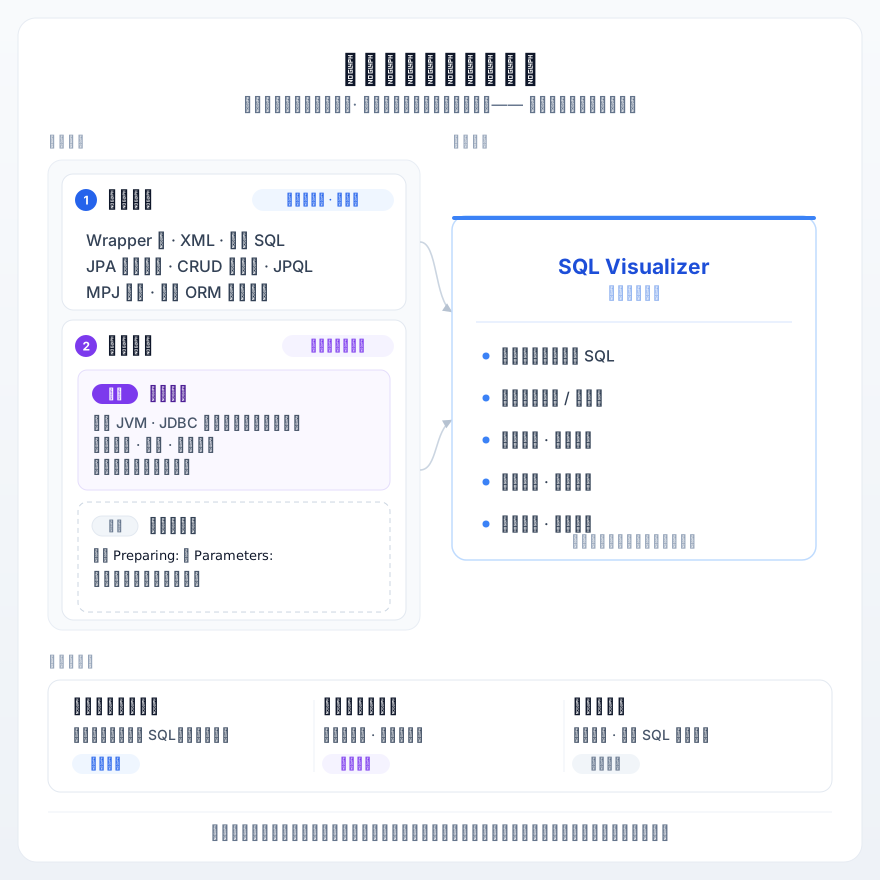
Static preview (the core of this plugin): place the caret on a Wrapper chain or mapper statement and get the SQL with real parameters immediately — no Spring context, no database connection. Great for verifying logic while coding, reviewing SQL in code review, or teaching newcomers what each API call produces.
Log restore (the route of MyBatis Log Plugin family): after the application starts, stitch the Preparing: and Parameters: lines from the console into a complete SQL. Great for inspecting real execution in staging or production.
The two are not mutually exclusive. The SQL Log tool window of SQL Visualizer uses enhanced capture by default — collecting at the JDBC layer inside your application's own JVM, with no logging needed in your app, real parameter values and durations, and the call stack and source location included. Console capture is kept as the no-code-change fallback. Jump-to-source and jump-from-call-stack both live in this same pipeline.
Where it shines
- Large projects with slow startup, when you just want to confirm a condition-building line
- Complex MPJ join queries where you want to verify the JOIN shape quickly
- Checking the WHERE clause before a batch update / delete to avoid touching the whole table
- Taking over a JPA / Hibernate legacy project and wanting to see what derived queries and HQL actually produce
When it is not the right fit
Honest boundaries, so you don't install it only to find it doesn't apply:
- Non-JVM stacks: the plugin serves MyBatis / MyBatis-Plus / JPA / Hibernate and other JVM ORM chain frameworks on the Java side — other language stacks are out of scope.
- You want end-to-end performance profiling: the plugin only does SQL capture from your local JVM plus static preview; it is not an APM — there is no distributed tracing or aggregate dashboard.
- You need a byte-for-byte replica of runtime SQL: static preview is a semantic simulation, so a few shapes differ from runtime (for example a pagination literal is computed directly as
LIMIT 0, 10, while runtime rendersLIMIT ?, ?); the boundaries are documented in the FAQ.
Next steps
- Getting Started — install in 3 minutes and produce your first preview
- Feature Guide — capability details per ORM stack
- Configuration — dialect, logic delete, multi-tenant, MCP tools and more